Line math
Quantity × unit price is checked on every line, and the lines are added up against the subtotal. A line that is off says by how much.
Invoice and bill capture for finance teams
Vendor, line items, tax and totals are read from PDFs, scans and phone photos. Line math, subtotal + tax and possible duplicates are checked, and every flag shows its reason. Nothing posts to QuickBooks Online, Xero or Zoho Books without an approval.
Up to 3 invoices a day without signup. No card required.
Line items on every plan · QuickBooks Online · Xero · Zoho Books · Excel · CSV
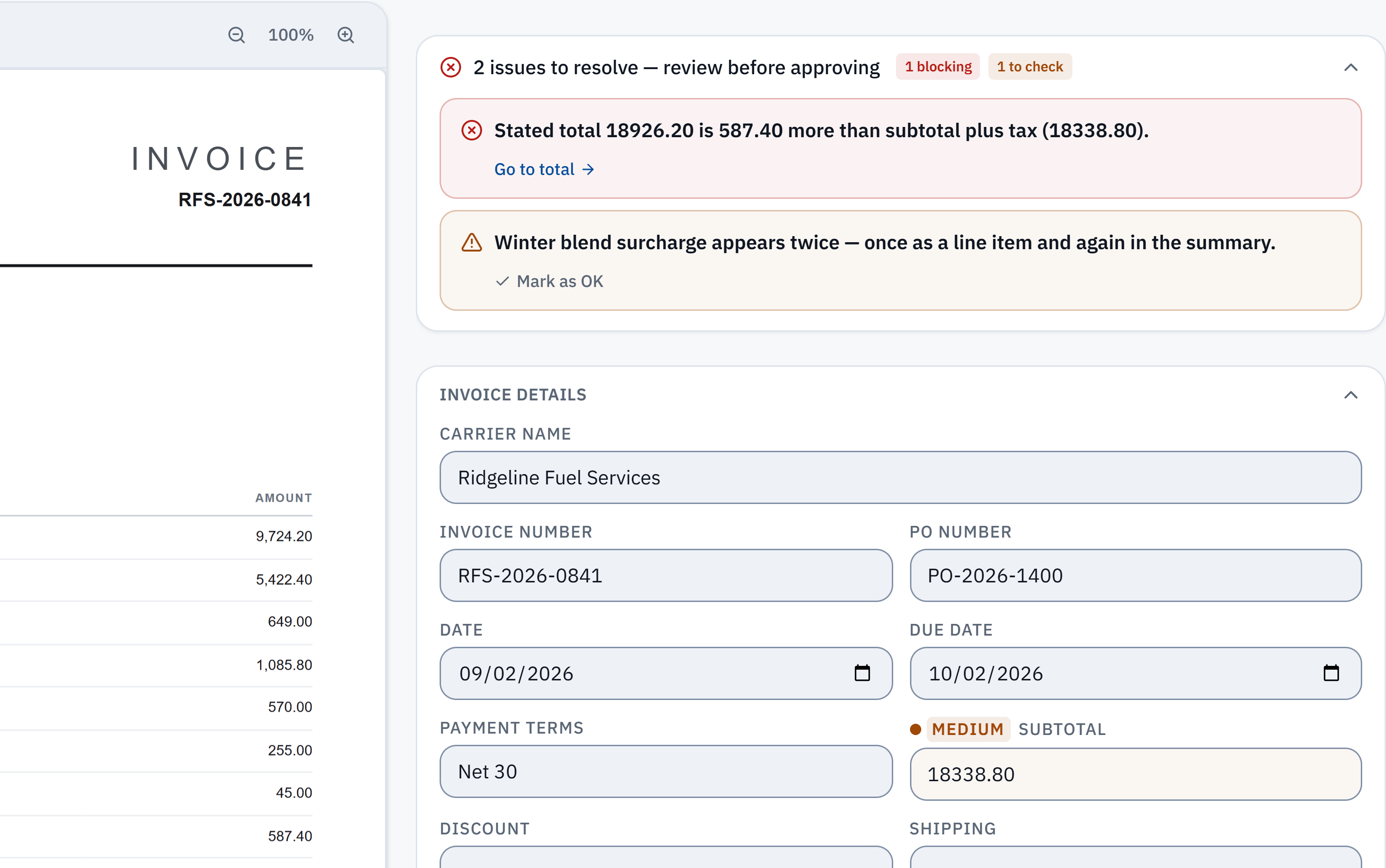
18,926.20 − 18,338.80 = 587.40. The stated total does not reconcile with the extracted subtotal and tax. Check it against the source.
Winter blend surcharge appears in a line item and the summary. A reviewer needs to check whether it was counted twice; this is a flag, not a deletion.
Who it is for
Many clients in one workspace, each with its own email-in address. Staff review the flagged bills, not every bill.
See how it fitsMonthly bill entry for clients: every line read, the totals checked, then pushed to QuickBooks Online or exported.
See how it fitsApproval chains, duplicate checks and a recorded history of who approved what, and when.
See how it fitsFor owners doing their own books. Supplier bills checked before they reach your books, 25 a month free.
See how it fitsCosts tagged to trip numbers, each invoice kept in the currency it was billed, handwritten slips read.
See how it fitsWhat it checks
Reading gets the figures off the page. The checks test whether those figures agree with each other. The first three run on every plan, Free included.
Quantity × unit price is checked on every line, and the lines are added up against the subtotal. A line that is off says by how much.
Subtotal − discount + shipping + fees + tax must equal the stated total. A mismatch is flagged with the exact difference, like the $587.40 above.
Each new bill is compared with every invoice your workspace received in the last 400 days, on vendor, invoice number, amount and date, near matches included. Bills that state different invoice numbers are not grouped. Nothing is removed without your decision.
Team and Scale
A bill at twice or more, or a third or less, of that vendor’s average for the same client and currency is listed for a second look.
In our own benchmark of 181 synthetic test documents, run through live production on 3 October 2026, all 5 invoices whose printed figures did not add up were flagged. 2 of the 172 that did add up were flagged as well: both were badly blurred photos.
Approvals, rejections and corrections are recorded with who and when. Editing a money field on an approved invoice withdraws the approval, so the bill is approved again before it is pushed.
Description, quantity, unit price and amount, for every line, on every plan including Free. Tax is read per rate, so a bill with two VAT rates keeps both.
Customer evidence · freight operator
Lombard International
Walvis Bay, Namibia
Cross-border freight · three currencies
“It regularly catches duplicates, wrong calculations, and miscoded entries before they hit the books.”
“In a typical 10-hour admin workday, IPP has cut the time spent on accounting and documents by more than half.”
Rika Lombard, owner · customer-reported experience
Read the customer storyFrom the first upload to your accounting system
Upload PDFs, scans or photos, or forward them to an inbox address. Email intake is on every plan.
Review the confidence on each field and any arithmetic or duplicate flag, beside the source page. Code the bill to a GL account; that vendor’s next bill starts with it.
Resolve the exceptions and approve each bill. Nothing goes to your accounting system without an approval.
Push approved bills to QuickBooks Online, Xero or Zoho Books on a paid plan, posted to the selected invoice expense account, a matching client default, or the workspace default set in Integrations. Or download CSV and Excel on any plan.
Try the check yourself
Open a sample invoice, see the line that doesn't add up, and download it as Excel. It uses fictional data and never posts to your books.
Open the sampleSelf-service PO matching is not available today. IPP does not move money: it prepares bills, and payments stay in your own systems.
Connect one QuickBooks Online, Xero or Zoho Books company per workspace, review the extracted data, then push approved bills. Pushes are on paid plans and the trial; CSV and Excel export are on every plan.
QuickBooks Online bills can carry VAT on your own QuickBooks tax codes. Xero and Zoho Books pushes do not set tax codes yet.
Upload a document, understand a flag, and prepare an approved bill for your books. A short, narrated walkthrough with captions and sample data.
Watch with chapters and transcript →65 seconds · AI narration and captions · no live extraction or ERP post
For freight & logistics
Freight operators tag a trip number to a whole invoice or to a single line, keep each cost in the currency it was billed, and send handwritten fuel slips through their own lane. Trip numbers can be added after approval, when the paperwork arrives weeks after the load.
Matching a carrier's invoice to an agreed rate is not available yet.
AP automation for freight & logisticsMonth-end, currency costing and per-load margins: the freight AP guides.
Your assumptions, your estimate
Include time spent uploading, correcting, reviewing exceptions and exporting. These starting values are illustrative, not measured customer results.
$249 per month.
Estimated monthly labor value less subscription$1,997
5 full workdays back a month.
Based on an 8-hour workday and your inputs.
40.8 hours saved per month · $1,832 first-month value after setup
Negative values mean the modeled cost exceeds the labor value saved. Time recovered is capacity, not necessarily cash savings. Annual first-month value uses an allocated monthly fee, not the upfront cash payment.
Start a 14-day trial with 50 invoices. Continue on Free with 25 invoices a month. Paid plans add accounting sync; Team and Scale add approval workflows and a client upload portal.
Three things: quantity × unit price against each line amount, the lines against the subtotal, and subtotal − discount + shipping + fees + tax against the stated total. A mismatch is flagged with the difference and the figures behind it, and lowers that invoice’s confidence. The reviewer decides what happens next.
Yes. Line items are extracted on every plan, Free included, and the arithmetic and duplicate checks run on every plan. Paid plans add the push to QuickBooks Online, Xero or Zoho Books.
No. Keep QuickBooks Online, Xero or Zoho Books. Direct sync is available on paid plans and during the trial; CSV and Excel export are included on every plan.
Start with a 14-day trial and 50 invoices, without a card. Then continue on Free with 25 invoices per month and CSV / Excel export. You are charged only if you choose a paid subscription.
Yes. Explore the guided sample with fictional invoice data. It demonstrates the review workflow without creating an account, sending a document for extraction or connecting your books.
Up to 3 invoices a day, no signup. Or try a sample first.