Line item extraction
Invoice line item extraction, from source to Excel
Last updated
Invoice line item extraction reads each row’s description, quantity, unit price and amount alongside the invoice header. IPP includes line items on every plan, checks quantity × unit price and lines against the subtotal, and keeps the rows in Excel. Use confidence scores and the source document to review the result before approval; direct accounting pushes use the selected invoice expense account, a matching client default, or the workspace default.
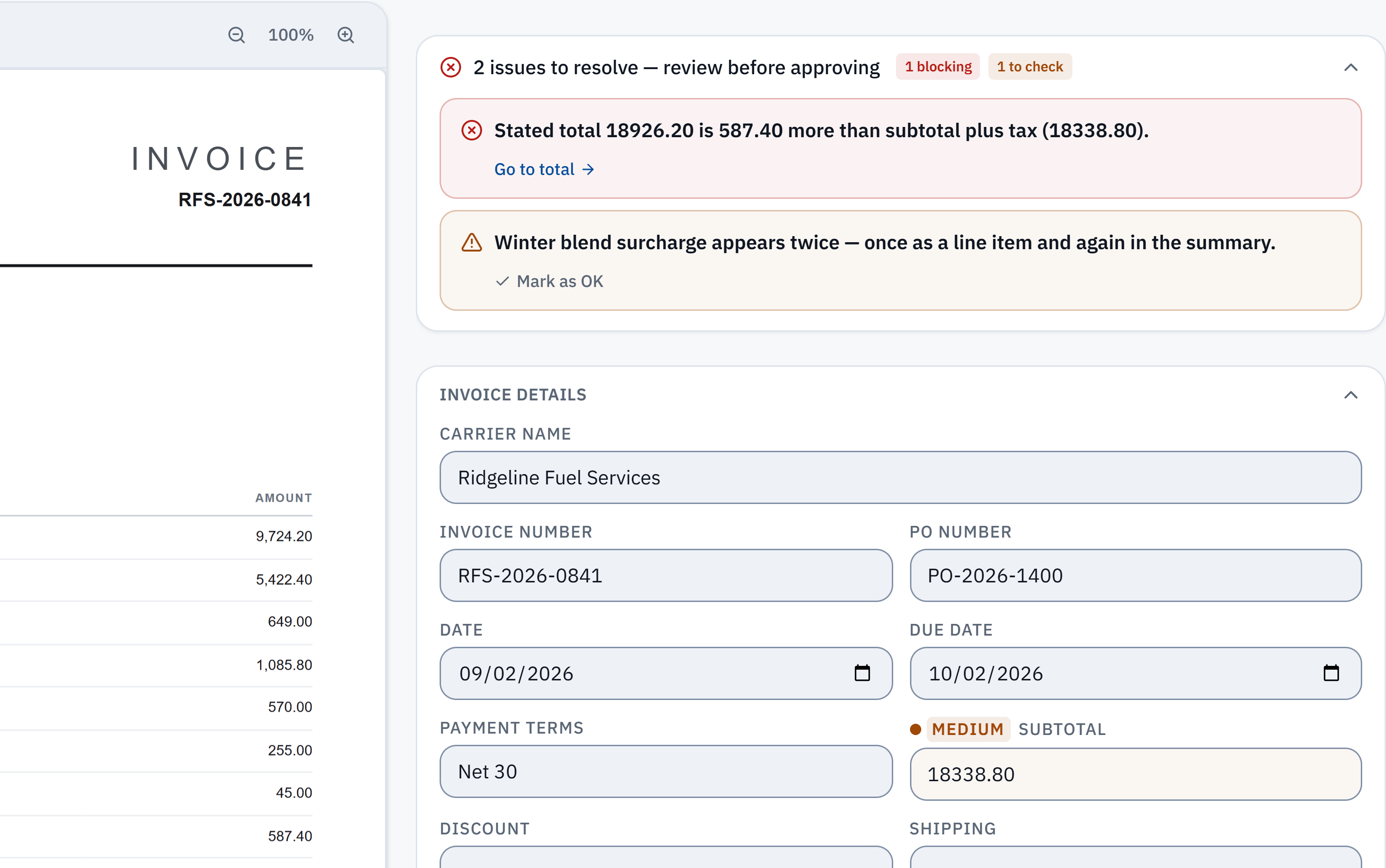
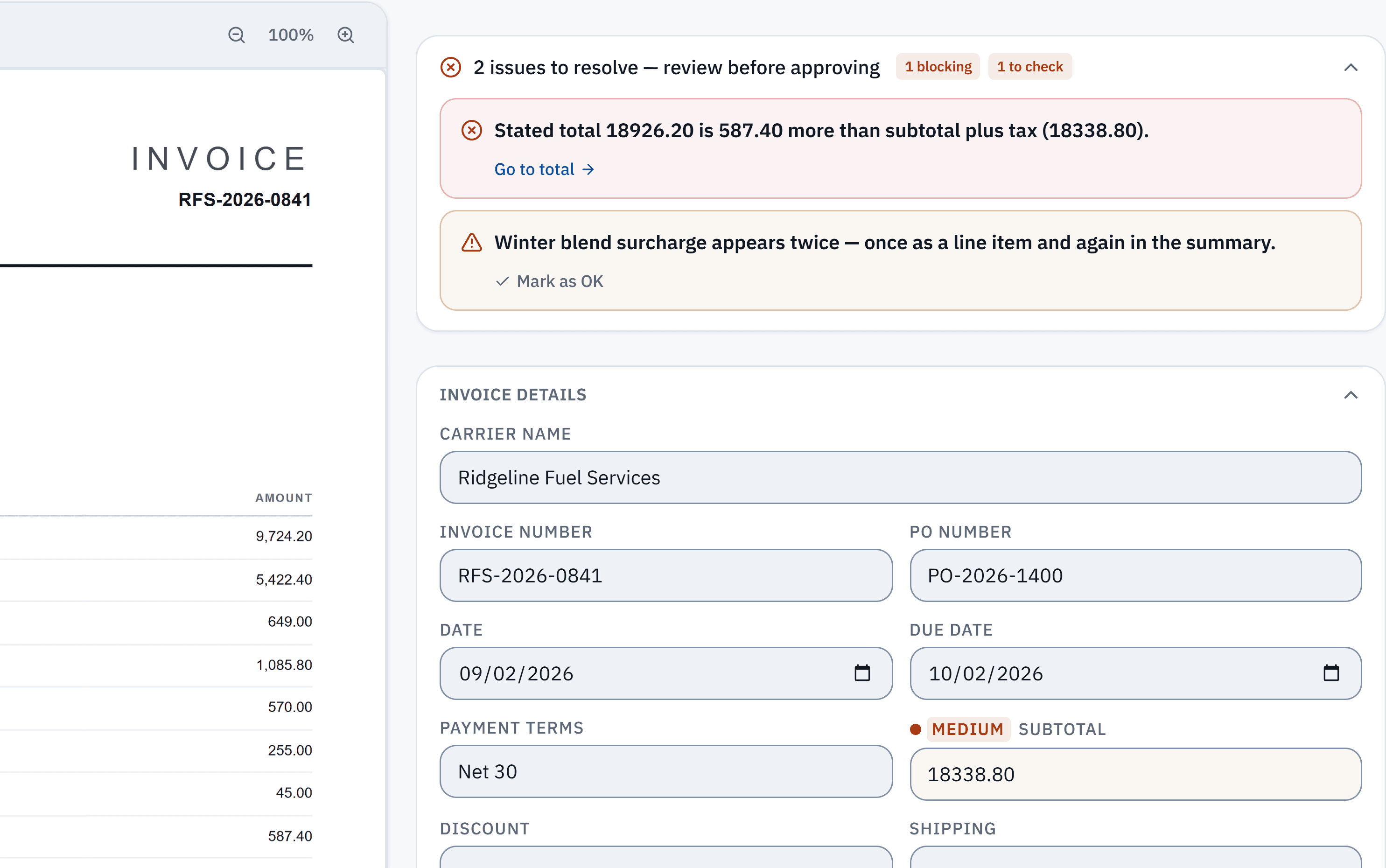
18,926.20 − 18,338.80 = 587.40. The stated total does not reconcile with the extracted subtotal and tax. Check it against the source.
Winter blend surcharge appears in a line item and the summary. A reviewer needs to check whether it was counted twice; this is a flag, not a deletion.
Without IPP
Extract line items by hand
- 1
Set fixed columns
Use the same columns for every supplier: invoice number, supplier, line number, description, quantity, unit price, tax, line amount.
- 2
Copy each row
Copy or type every line, including discount, freight and surcharge lines. If the PDF has selectable text, copying the table saves typing; a scan has to be typed.
- 3
Check each line
Quantity times unit price should equal the line amount. Where it does not, the invoice may show a discount or a rounding the line hides.
- 4
Check the lines against the totals
The lines should add up to the subtotal, and subtotal plus tax and charges to the total. A gap usually means a missed line or a charge counted twice.
- A 30-line invoice is 30 rows of typing and 30 checks, per invoice.
In InvoiceParser Pro
Extract line items with IPP
- 1
Upload the invoices
Up to 50 PDFs, scans or photos at once, or up to 3 a day on the free tool with no account. A multi-page invoice is read as one document.
- 2
Every row is read
For each line: description, quantity, unit price and amount, in the invoice’s own currency. The tax lines are kept separately with their rates, so a mixed-rate VAT invoice keeps each rate.
- 3
Every row is checked
IPP checks quantity times unit price on each line, and the lines against the subtotal and total. A gap is flagged with the figures, beside the page.
- 4
Use the lines
Download Excel (a Line Items sheet with every row of every invoice), push bills to QuickBooks Online or Xero with one line per invoice line, or read them through the API on the Scale plan.
Where IPP removes steps
- Reading rows
- By hand: Typed or copied per row.
- With IPP: Read for every row of every invoice.
- Per-line arithmetic
- By hand: Checked by hand, if at all.
- With IPP: Quantity times unit price checked on each line.
- Lines vs totals
- By hand: Your own SUM.
- With IPP: Checked on every invoice; a gap is flagged with the difference.
- Same columns for every supplier
- By hand: Re-mapped per layout.
- With IPP: One layout in the Line Items sheet and the API.
Do QuickBooks and Xero extract line items?
Not from an uploaded bill, going by their own help pages. Intuit says QuickBooks Online pulls the date, amount, vendor and card digits from a receipt or bill you upload or email. Xero says an uploaded bill fills the contact, date, total, due date and reference. In both, the lines are typed in afterwards.
That is the gap IPP fills: it reads the lines and checks them before the bill is created. The step-by-step for each is on the QuickBooks and Xero guides.
Sources: Intuit: Email receipts and bills and Xero Central: Upload bills into Xero, read 3 October 2026.
Lines that trip up extraction
These are the rows that most often break a line table, and what IPP does with them:
- Percentage lines, such as a surcharge charged as a percentage of a base amount: the base printed in the quantity column is never taken as the line amount or the total.
- A shipping or fee charge that is already one of the lines and appears again in the summary: the total check accepts it counted once instead of flagging a false mismatch.
- Lines priced in one currency with the amount due in another: the amount due is kept in its own currency, and the lines are not added up against a total in a different currency.
- Totals written with a space between the thousands ("7 319.67"): read as one number, not cut in two.
How well does the reading hold up?
In IPP's own benchmark, 181 synthetic test documents (clean PDFs, scans, phone photos and handwritten invoices) went through live production on 3 October 2026. 174 of the 181 came back with every key header field right, and 174 of the 179 documents with line items had every line right. That is a benchmark on test documents, not a promise about yours.
Method, misses and downloadable samplesWhat IPP does not do
- All lines of one bill go to one expense account in QuickBooks or Xero; there is no per-line account split.
- The CSV export is one row per invoice; the lines are in the Excel workbook, the push and the API.
- Product codes and units are not separate columns in the exports; they stay in the description.
- Handwritten line tables are read, with more rows left for you to check.
Questions
What is invoice line item extraction?
Reading each row of an invoice’s table (description, quantity, unit price and amount) into structured data, as well as the header fields such as supplier, number, dates, tax and total.
Is line item extraction included on the free plan?
Yes. Line items are read on every plan, including the free plan of 25 invoices a month, and on the no-signup free tool.
Does it handle invoices whose line table runs over several pages?
A multi-page PDF is read as one document, so its lines come back together and are checked against its one total. Several separate files are not joined into one invoice.
Do I need a template per supplier?
No. There are no templates, per-supplier rules or training to set up; a new supplier’s layout is read the first time.
Can I get the lines into QuickBooks or Xero?
Yes. Pushed bills carry one line per invoice line: in Xero with description, quantity and unit price; in QuickBooks Online with the amount, and the description too on the VAT-codes path.
Try it on one of your own invoices
Upload a PDF, JPEG or PNG in the browser tool: up to three documents per browser per day, subject to shared limits. Excel keeps line items; CSV has one summary row per invoice. Unclaimed files expire after seven days. The Free workspace plan includes 25 invoices a month. Start the 14-day trial with 50 invoices, no credit card, then the Free plan to test approved accounting pushes.