Invoice OCR
Invoice OCR: read the fields, then check the bill
Last updated
Invoice OCR turns a scanned page into text. Invoice extraction identifies the supplier, dates, amounts and line items within it. IPP combines that reading with field confidence, the source document and exact arithmetic checks, so a reviewer can resolve issues before approval. Follow the plain-OCR method below or test a PDF, JPEG or PNG in the browser tool.
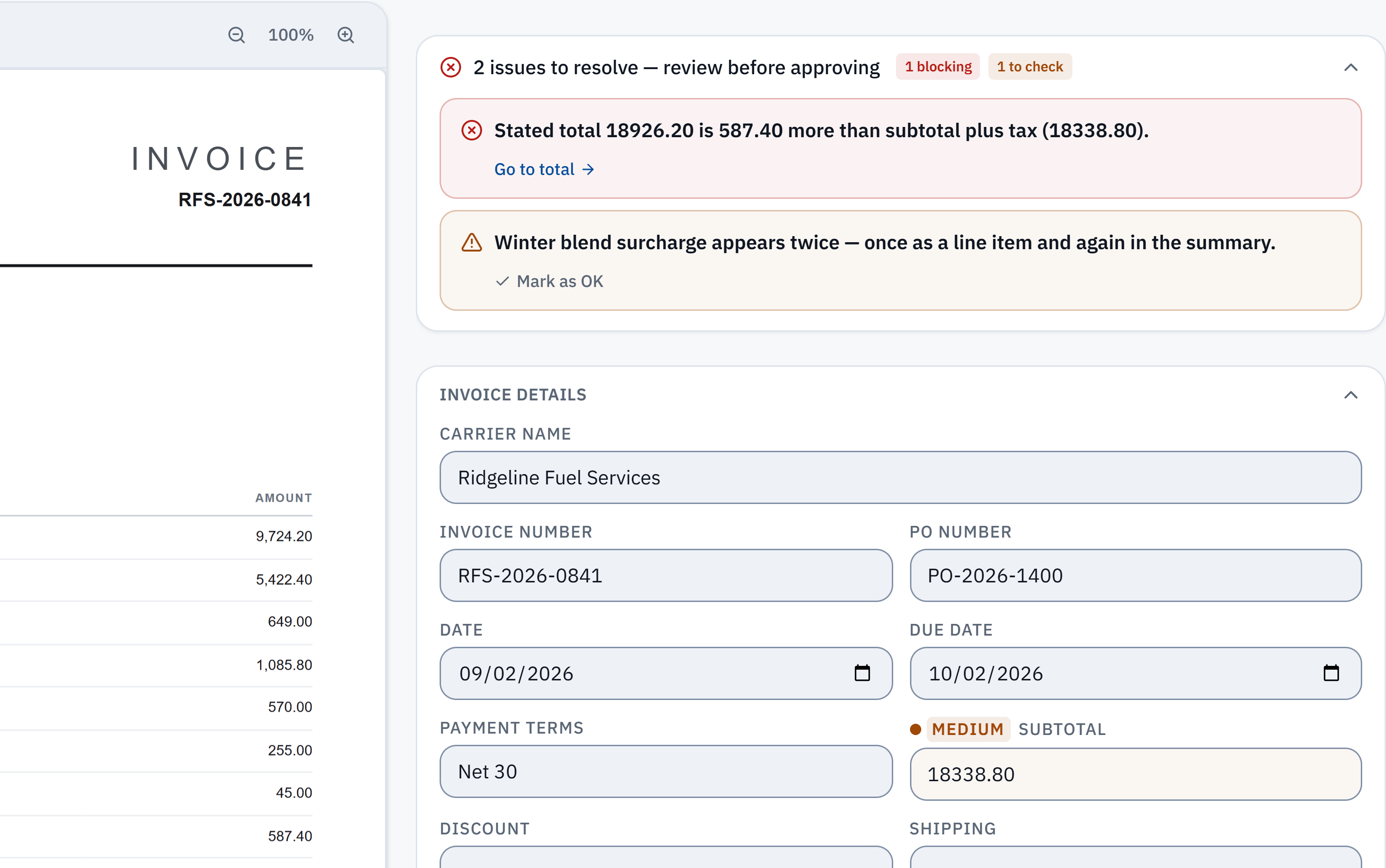
18,926.20 − 18,338.80 = 587.40. The stated total does not reconcile with the extracted subtotal and tax. Check it against the source.
Winter blend surcharge appears in a line item and the summary. A reviewer needs to check whether it was counted twice; this is a flag, not a deletion.
Without IPP
OCR an invoice with a general OCR tool
- 1
Scan or photograph it
Flat, in even light, with all four edges in frame, at around 200 to 300 DPI.
- 2
Run OCR
Use any OCR tool or a PDF editor’s text recognition to turn the image into selectable text.
- 3
Find the fields
Read through the text for the supplier, invoice number, dates, line items, tax and total. Columns often come out jumbled, so check each figure against the image.
- 4
Type them where they belong
Copy each value into your spreadsheet or accounting system, then re-add the totals.
- OCR text has no idea which number is the total. The finding, checking and typing are still yours.
In InvoiceParser Pro
What IPP does with each invoice
- 1
Checks the image first
The first page of a scan or photo is checked for size, light, sharpness and cut-off edges. An unreadable page is turned away; a poor one is read and graded down.
- 2
Reads the page
Microsoft’s Azure Document Intelligence reads the whole document: text, layout and invoice fields. If it returns nothing, GPT-4o reads the page images instead.
- 3
Has the reading checked
GPT-4o compares the reading with the page images and can correct a field. Corrections to totals, line amounts and dates are checked against what the page prints; one that contradicts it is not applied, and the invoice is graded down instead.
- 4
Checks the figures
Line amounts, subtotal, discount, shipping, fees, tax and total are re-added. Currency is worked out from the symbols, codes, bank details and addresses on the page. Statements and files holding several invoices are recognised and held.
- 5
Hands you the exceptions
Every field gets a High, Medium or Low grade with reasons. You review the flagged ones beside the source page, then export or push.
Plain OCR, a basic parser, and IPP
- Output
- By hand: Plain OCR: text in reading order.
- With IPP: Named fields: supplier, number, dates, lines, tax, totals, bank details.
- Templates
- By hand: Basic parsers: often one per supplier layout.
- With IPP: None; a new supplier is read the first time.
- Arithmetic
- By hand: Not checked.
- With IPP: Re-added on every invoice; mismatches flagged with the figures.
- Confidence
- By hand: One score for the page, if any.
- With IPP: Per field, with the reason.
- Wrong documents
- By hand: A statement reads like any other page.
- With IPP: Statements and multi-invoice files are recognised and held.
What happens to the invoices you upload
The pages go to Microsoft Azure and OpenAI to be read, and no invoice data is used to train AI models. The original file is stored with the result so a reviewer can see the page beside the fields. The security page lists every provider and what each one receives.
How well does the reading hold up?
In IPP's own benchmark, 181 synthetic test documents (clean PDFs, scans, phone photos and handwritten invoices) went through live production on 3 October 2026. 174 of the 181 came back with every key header field right, and 174 of the 179 documents with line items had every line right. That is a benchmark on test documents, not a promise about yours.
Method, misses and downloadable samplesWhat IPP does not do
- It is built and tested on English-language invoices. Invoices in other languages are not tested end to end.
- Handwritten invoices and poor photos are read, with more fields left to check.
- It does not split a file that holds several invoices; it flags it.
- It reads invoices you receive. Purchase orders are not read as documents of their own.
Questions
What is invoice OCR?
Software that reads a scanned, photographed or digital invoice and turns it into data. Plain OCR gives you the text; invoice OCR, or an invoice parser, puts each value in its field: supplier, number, dates, line items, tax and total.
What is the difference between an invoice parser and OCR?
OCR recognises characters. A parser understands the document: which figure is the total, which rows are line items, which date is the due date. A good parser also checks that the figures it read agree with each other.
Does IPP need a template for each supplier?
No. There are no templates, per-supplier rules or training phase.
Which files can it read?
Digital PDFs, scanned PDFs, and JPG or PNG photos; TIFF too when you upload in the app. Up to 50 files at once, or up to 3 a day on the free tool with no account.
How accurate is it?
IPP publishes its own benchmark on synthetic test documents, with the method, the misses and samples you can download, on the accuracy page. On your own invoices, each field’s confidence grade tells you what to check.
Try it on one of your own invoices
Upload a PDF, JPEG or PNG in the browser tool: up to three documents per browser per day, subject to shared limits. Excel keeps line items; CSV has one summary row per invoice. Unclaimed files expire after seven days. The Free workspace plan includes 25 invoices a month. Start the 14-day trial with 50 invoices, no credit card, then the Free plan to test approved accounting pushes.