Every bill checked and approved. Every decision on the record.
Bills arrive by upload or by email. Each one is read to the line and checked: line math, subtotal + tax, and duplicates against the last 400 days of invoices. Team and Scale route bills by amount or vendor to one approver or a multi-step chain. Every approval, correction and rejection goes into a hash-chained activity log, and nothing is pushed to your accounting system without an approval.
14-day free trial · No credit card required · Talk to us
Product capture · synthetic data
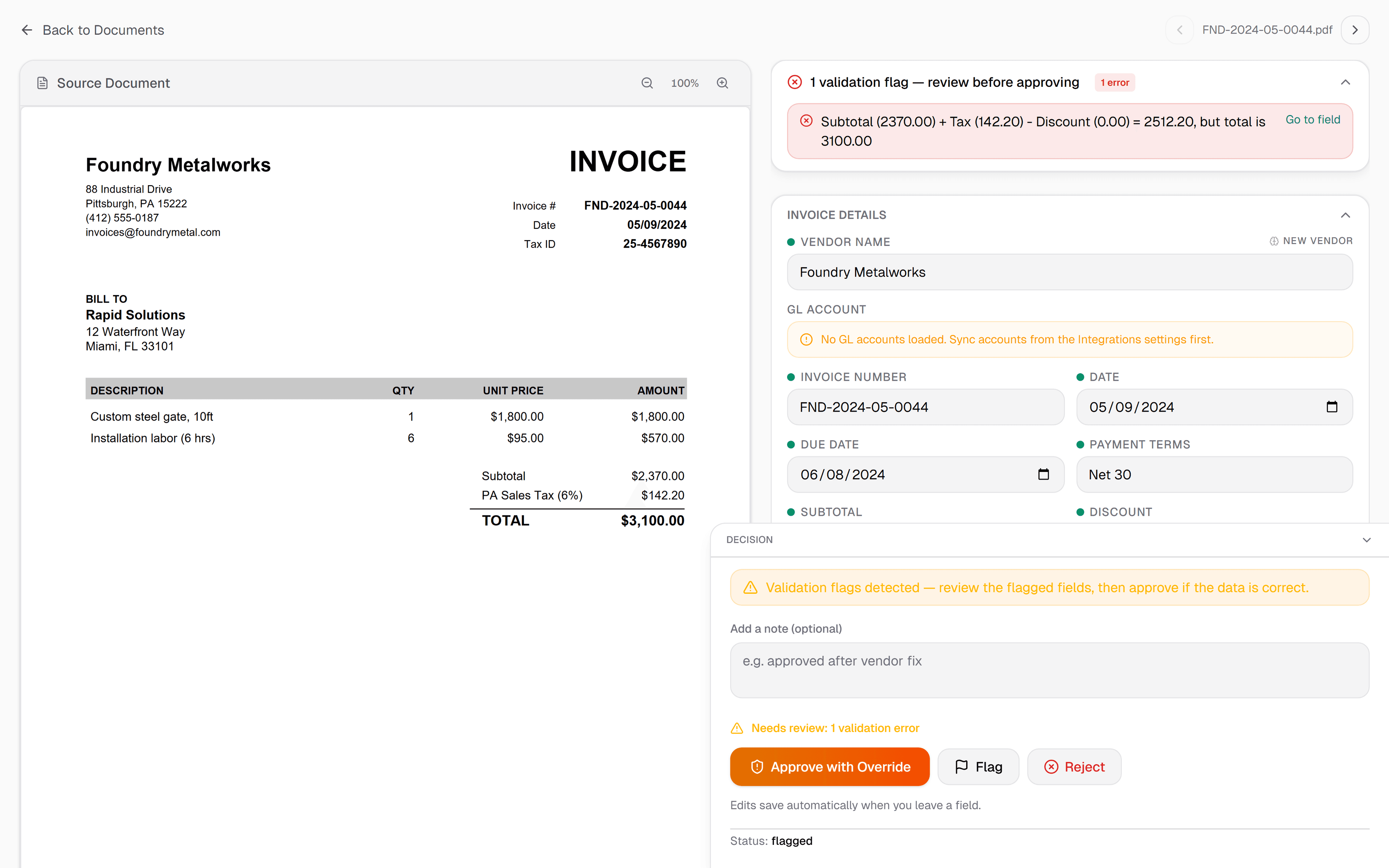
Built for the full AP workflow, end to end
Three steps. Invoice in, approved out.
Plans for every AP team
14-day free trial on all plans — includes approval workflows, audit trail, and direct sync to QuickBooks, Xero, and Zoho Books. No credit card required.
Built for the AP desk
Common questions
Put a week of bills through it.
The 14-day trial gives you 50 invoices and needs no card. Forward real bills to your inbox address and see which ones are flagged, and why. Or check a single document first, without an account.
14-day free trial · No credit card · Cancel anytime
Accounting handoff, with the limits stated
Paid plans and the trial can push approved bills. Each workspace connects to one company per provider; separate client books use exports or separate workspaces and sign-ins. Direct pushes use the selected invoice expense account, a matching client default, or your workspace default. QuickBooks supports mapped tax codes; Xero and Zoho Books pushes do not set tax codes.
Also built for
- Accounting firms Many clients in one workspace, each with its own email-in address. Staff review the flagged bills, not every bill.
- Bookkeepers Monthly bill entry for clients: every line read, the totals checked, then pushed to QuickBooks Online or exported.
- Small business owners For owners doing their own books. Supplier bills checked before they reach your books, 25 a month free.
- Freight and logistics Costs tagged to trip numbers, each invoice kept in the currency it was billed, handwritten slips read.
Want to see the check on your own paperwork first? Try a document: up to 3 invoices a day, no signup.
Supplier-document handoff
Bills and credits need different records
Review the source beside its fields. Choose supplier bill, credit note or debit memo, keep the document's own number, and enter an optional original-invoice reference separately. A negative total still takes priority as a credit; changing its kind does not rewrite the printed amounts.
A faithful download
Generic Excel and CSV retain the printed Total and add Document Type, Signed Total and Original Invoice Reference. A credit's signed total is negative while its printed source values stay intact. Save your corrections before downloading.
A clear provider handoff
Approved bills and credits use different objects: QuickBooks Vendor Credit and Xero credit note for credits. Creation does not allocate a credit to a bill or record a refund. Complete that step in your books. Direct credit-note push to Zoho Books is unavailable; its import ZIP separates credits and explains the next step.
A reviewer-entered original-invoice reference is a reference, not proof that IPP matched or applied the credit. Unreadable or unsupported signed amounts stay blank for review.