Batch invoice processing
Batch invoice processing for incoming supplier bills
Last updated
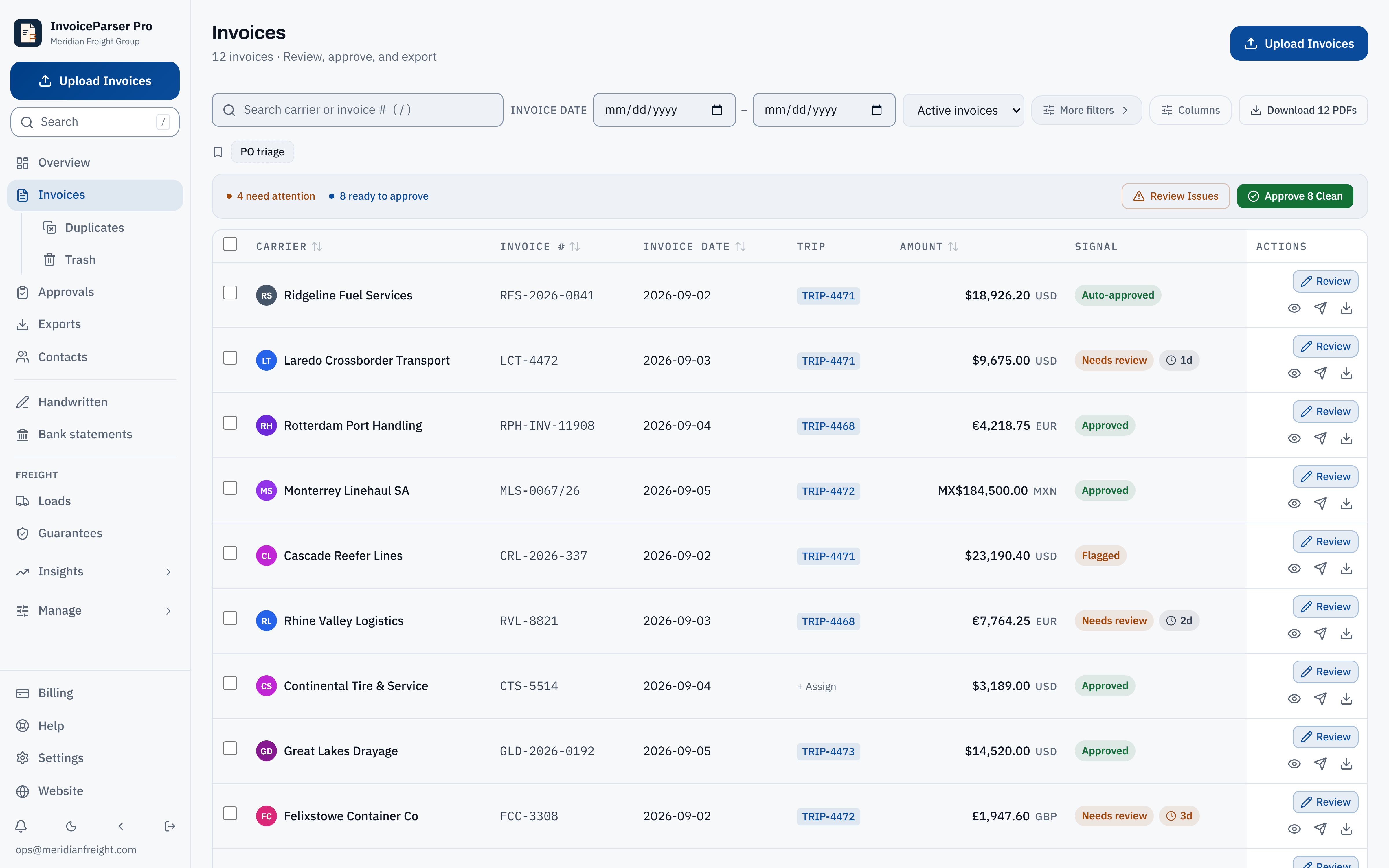
Batch invoice processing groups the supplier bills you receive for review and posting. In an IPP workspace, upload up to 50 documents at once, then review confidence, arithmetic mismatches and possible duplicates. Bulk approval skips blocking flags; flagged bills still need attention. Export the corrected batch or push approved invoices to your connected accounting system.
This page is about invoices you receive from suppliers (accounts payable). If you want to send a batch of invoices to your customers, that is batch invoicing, a billing feature of your accounting or billing software. IPP does not create or send invoices.
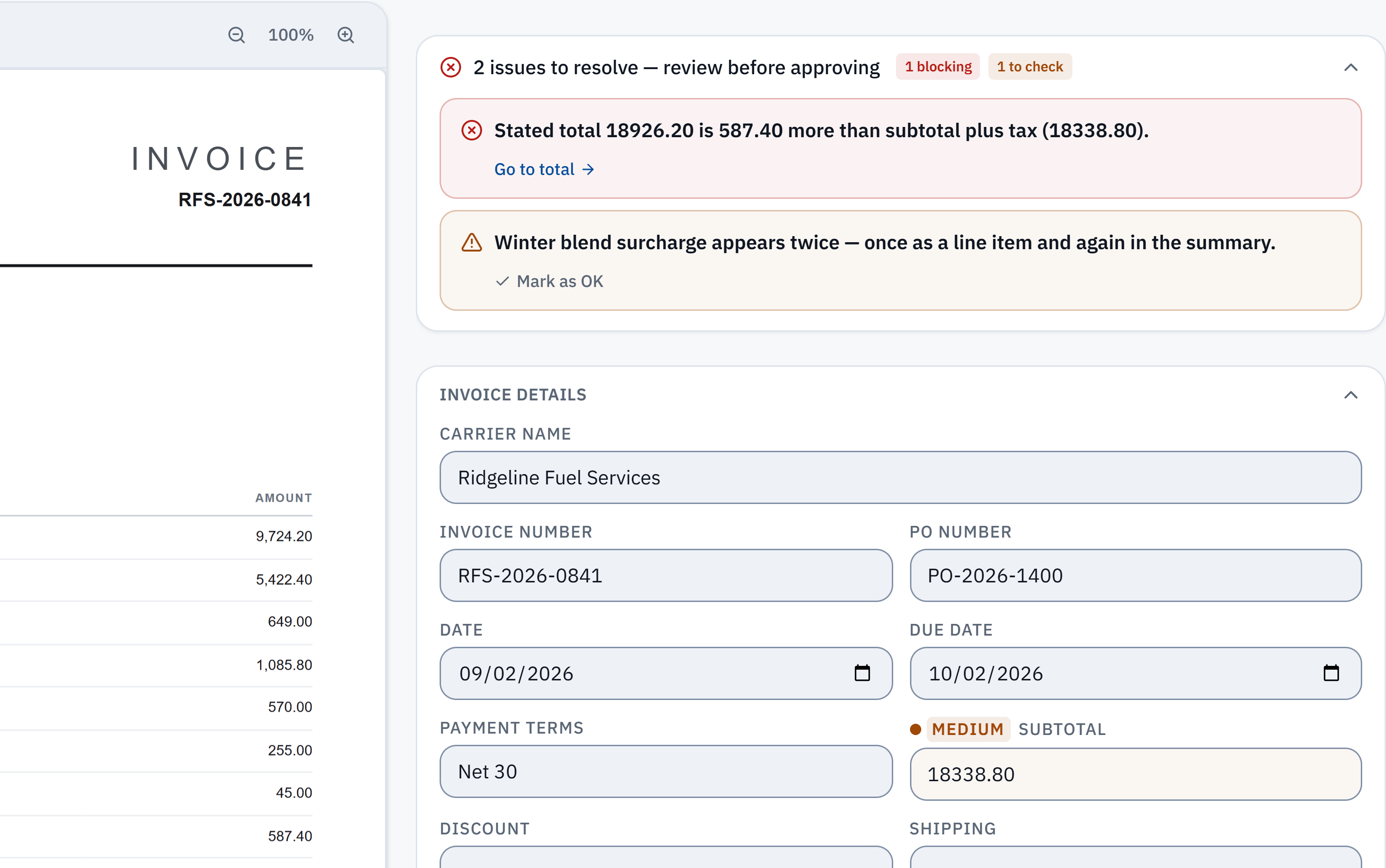
18,926.20 − 18,338.80 = 587.40. The stated total does not reconcile with the extracted subtotal and tax. Check it against the source.
Winter blend surcharge appears in a line item and the summary. A reviewer needs to check whether it was counted twice; this is a flag, not a deletion.
Without IPP
Process a batch by hand
- 1
Collect the batch
Gather the period’s invoices (a day, a week, a supplier run) in one folder or tray. Pull out statements, quotes and copies of invoices you already have.
- 2
Total the batch first
Add up the invoice totals before entering anything, per currency. This is the batch control total.
- 3
Enter each invoice
Key the header, lines and tax of each invoice into your accounting system.
- 4
Reconcile the batch
Add up what you entered and compare it with the control total. A difference means an invoice was missed, entered twice or keyed wrong.
- 5
Approve and post
Get the batch signed off, post it, and file the originals together.
In InvoiceParser Pro
Process a batch in IPP
- 1
Upload the batch
Select Upload Invoices and add up to 50 files at once (PDF, PNG, JPG or TIFF). Suppliers can also email invoices to the inbox address IPP gives each client, so the batch builds itself.
- 2
They are read in parallel
Each invoice is read and checked on its own: header, lines, tax, the arithmetic, and duplicates against your recent invoices. Files that could not be read are listed with the reason, ready to copy back to whoever sent them.
- 3
Triage the list
The Invoices list shows how many need attention and how many are ready to approve. Approve the clean ones in one click; bulk approval holds back any with a blocking flag.
- 4
Review the flagged ones
Open each flagged invoice beside its page: a total that does not add up, a low-confidence field, a possible duplicate.
- 5
Post the batch
Push the approved batch to QuickBooks Online, Xero or Zoho Books (paid plans and the trial), or download it as Excel or CSV. A download made after corrections includes them. You can also download the batch’s PDFs, renamed by supplier and invoice number.
Where IPP removes steps
- Sorting out statements and repeats
- By hand: By eye.
- With IPP: Statements held; possible duplicates flagged.
- Entering the batch
- By hand: One invoice at a time.
- With IPP: Up to 50 read in parallel.
- Control total
- By hand: Added up twice by hand.
- With IPP: Every invoice’s own arithmetic checked; totals shown per currency, never mixed.
- Approval
- By hand: Batch signed off on paper.
- With IPP: Clean invoices approved together, flagged ones one by one, all logged.
- Posting
- By hand: Typed into the books.
- With IPP: One push, or one download.
Try a check you can repeat
Start with a worked invoice example
Download a fictional invoice, work through its printed figures, then compare what the tool reads. The examples show calculated expectations, not live extraction results or a competitor test.
Watch a short tutorial with a transcriptCheck one of your own invoicesUp to three documents per browser per day, subject to shared limits. No signup needed.
How well does the reading hold up?
In IPP's own benchmark, 181 synthetic test documents (clean PDFs, scans, phone photos and handwritten invoices) went through live production on 3 October 2026. 174 of the 181 came back with every key header field right, and 174 of the 179 documents with line items had every line right. That is a benchmark on test documents, not a promise about yours.
Method, misses and downloadable samplesWhat IPP does not do
- It does not create or send invoices to customers (batch invoicing).
- It does not pay the batch.
- Up to 50 files per upload; a bigger pile goes in several uploads.
- A single PDF holding several invoices is flagged and held, not split. Scan one invoice per file.
Questions
What is batch invoice processing?
Handling the supplier invoices you receive in groups: collecting them, entering them together, checking the group adds up, approving and posting it. It is part of accounts payable.
Is batch invoice processing the same as batch invoicing?
No. Batch invoicing is sending many invoices to your customers at once, a billing feature. Batch invoice processing is entering the invoices you receive. IPP does the second.
How many invoices can I upload at once?
Up to 50 files per upload, processed in parallel. Invoices emailed to a client’s inbox address are processed as they arrive.
Can I mix scanned and digital invoices in one batch?
Yes. PDFs, scans and photos can go in the same upload; each is read on its own.
What happens to invoices in different currencies?
Each keeps the currency it was issued in, and totals are shown per currency. Amounts in different currencies are never added together.
Try it on one of your own invoices
Upload a PDF, JPEG or PNG in the browser tool: up to three documents per browser per day, subject to shared limits. Excel keeps line items; CSV has one summary row per invoice. Unclaimed files expire after seven days. The Free workspace plan includes 25 invoices a month. Start the 14-day trial with 50 invoices, no credit card, then the Free plan to test approved accounting pushes.