Vendor Bill OCR
Vendor bill OCR that checks the totals
InvoiceParser Pro extracts vendor, date, due date, invoice number, line items, taxes, discounts, shipping, subtotal, and total from bill PDFs, scans, and photos, then flags issues before export.
Free: 25 invoices/month. 14-day trial with 50 invoices, no credit card, then the Free plan.
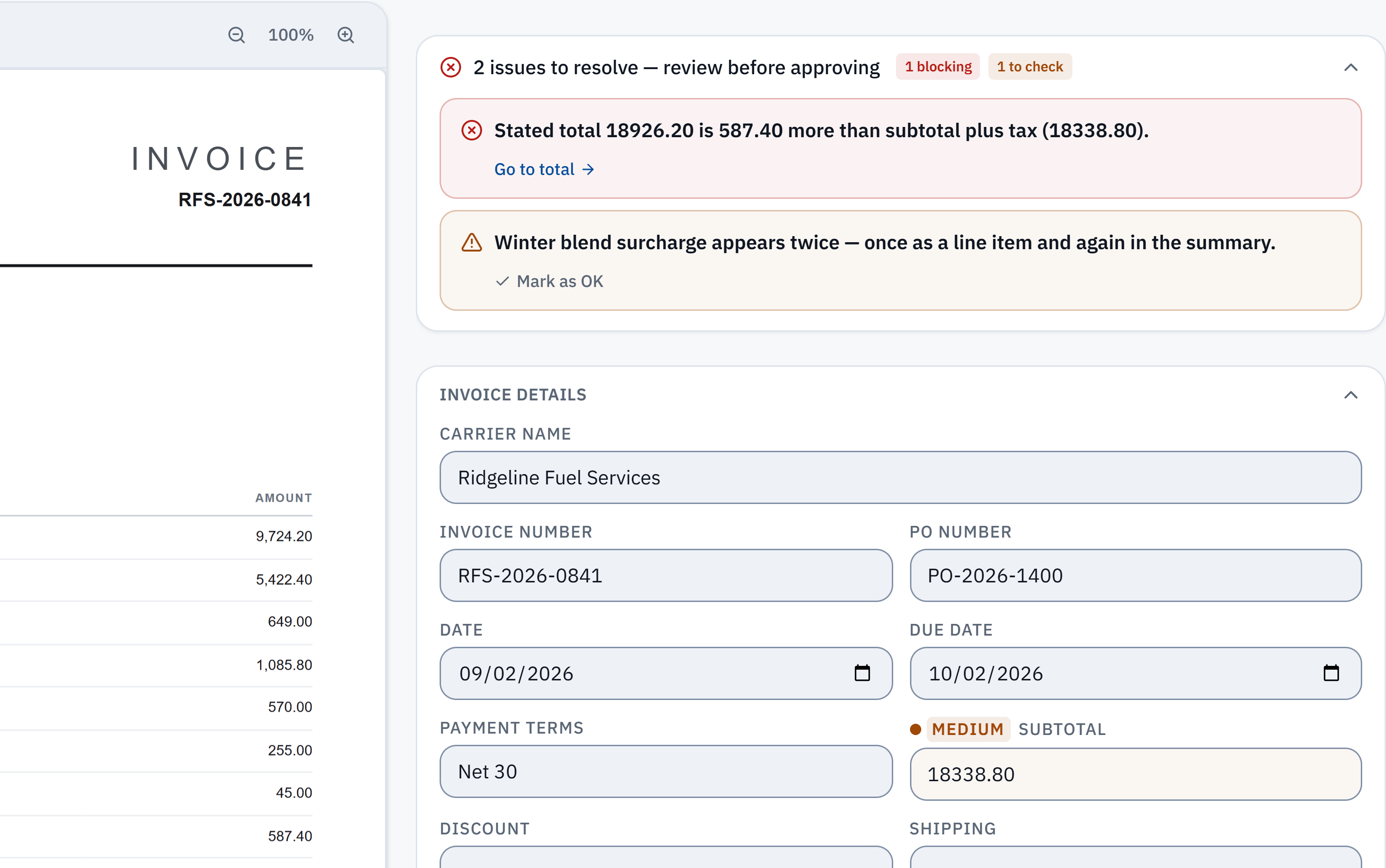
18,926.20 − 18,338.80 = 587.40. The stated total does not reconcile with the extracted subtotal and tax. Check it against the source.
Winter blend surcharge appears in a line item and the summary. A reviewer needs to check whether it was counted twice; this is a flag, not a deletion.
OCR is useful only when the bill data is review-ready.
Vendor bills often include dense tables, tax components, shipping lines, discounts, and inconsistent formats. IPP turns them into data your team can approve.
Vendor and bill header
Extract vendor name, invoice number, invoice date, due date, payment terms, and document totals.
Line items and taxes
Capture each bill row plus tax detail so your review process does not stop at a single total.
Validation before export
Arithmetic mismatches are flagged for review alongside the source invoice. Review flagged bills and approve eligible bills before a paid accounting push. Excel and CSV support the review handoff.
Built for bookkeepers, accounting firms, and AP teams
Solo bookkeepers
Use OCR to turn client vendor bills into reviewed data without typing every line by hand.
Accounting firms
Separate client bill queues and upload links inside one workspace.
AP teams
Review exceptions, catch unusual totals, and export structured bill data for downstream approval.
Basic OCR vs. InvoiceParser Pro vendor bill OCR
Free PDF readers and basic OCR utilities can extract raw text from a vendor bill. But raw text is not structured data — your team still has to identify the vendor, label the fields, reassemble the line item table, and verify the math before anything reaches your accounting system.
Basic OCR (PDF readers, free tools)
InvoiceParser Pro vendor bill OCR
Common questions
What is vendor bill OCR?
Vendor bill OCR reads bill PDFs, scans, or photos and turns the data into structured fields such as vendor, dates, line items, taxes, and totals.
Can InvoiceParser Pro process photographed bills?
Yes. InvoiceParser Pro supports invoice photos as well as digital PDFs and scanned PDFs. Low-confidence fields are flagged for review.
Does it validate vendor bill totals?
Yes. The platform checks invoice math and flags mismatches before approved data is exported.
Which accounting tools are supported?
Excel and CSV retain reviewed data. Paid accounting pushes to QuickBooks Online, Xero and Zoho Books use the selected invoice expense account, a matching client default, or the workspace default; QBO tax codes require mapping, while Xero/Zoho codes are not set. One company per provider connects to a workspace.
Which currencies does InvoiceParser Pro support for vendor bill OCR?
InvoiceParser Pro extracts the currency symbol or code as it appears on the bill and preserves it alongside the numeric values. This means USD, EUR, GBP, CAD, AUD, INR, and other major currencies are all captured without any currency-specific configuration. The platform does not perform currency conversion — exports preserve the extracted currency. Confirm the connected company’s currency support before pushing; IPP does not guarantee every currency is accepted by the destination.
How does vendor bill OCR handle poorly-scanned or low-quality documents?
InvoiceParser Pro is designed for real-world document quality, not perfect scans. When a scan is skewed, low-resolution, or has background noise, the extraction model still attempts to identify and label every field. Fields where the model is uncertain receive a lower confidence score and are surfaced in the review queue rather than being silently passed through. Confidence and arithmetic signals guide review; inspect the source because they do not guarantee every reading is correct.
Does it work for international vendor bills that include VAT or GST?
Yes. InvoiceParser Pro extracts tax components as separate line items when they appear on the bill. This includes VAT (common in Europe, the UK, and many other jurisdictions), GST (used in Australia, Canada, India, and others), CGST and SGST (India-specific components), and other regional tax identifiers. Each tax component is captured as a labeled field so your accounting team can code it correctly rather than treating the entire tax as a single undifferentiated amount.
What accuracy can I expect across different vendor bill document types?
Accuracy varies by document type. Digital vendor bill PDFs generated by accounting software or vendor billing systems typically yield the highest field accuracy because the text layer is machine-readable. Scanned paper bills from a flatbed scanner at 300 DPI or higher also perform well. Photographed bills taken under good lighting with a modern smartphone camera are generally reliable for header fields and straightforward line item tables. Complex layouts — such as hand-annotated bills, carbonless copy forms, or invoices with overlapping watermarks — produce more low-confidence fields and require proportionally more review time. Use the source document to verify important fields; confidence is a review signal, not a guarantee. IPP’s own dated synthetic benchmark is on /accuracy.
Turn vendor bills into reviewed data.
Start with the invoices that waste the most time: scans, photos, multi-line bills, and tax-heavy vendor PDFs.
InvoiceParser Pro publishes its prices: Free for 25 invoices a month (1 user, no credit card); Starter $79 a month for 200 invoices and 3 users; Team $249 a month for 1,000 invoices and unlimited users; Scale $599 a month for 5,000 invoices, with API access. Billed annually they are $63, $199 and $479 a month. For more than 5,000 invoices a month, email us about Enterprise and we'll scope it with you.