Month-end bill entry, without the typing. Checked before it reaches QuickBooks.
Forward a client's bills to that client's inbox address, or upload them. Vendor, date, line items, tax and totals are read, then checked: each line's math, subtotal + tax, and duplicates against the last 400 days of bills. You review what is flagged, approve, and push to QuickBooks Online, Xero or Zoho Books.
Up to 3 invoices a day without signup. No card required.
Product capture · synthetic data
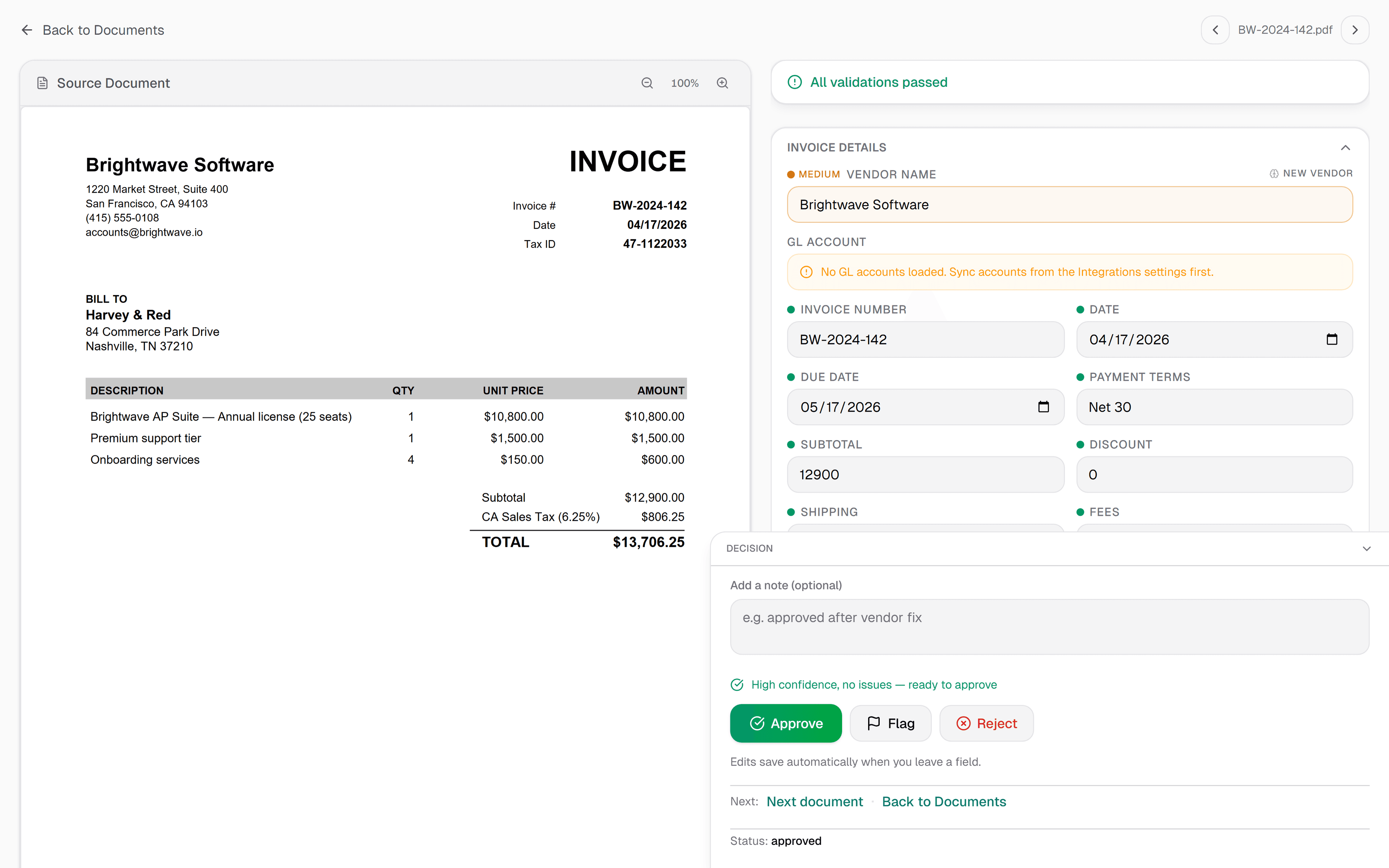
Review workbench
Source document, extracted fields, line items, and approval in one view
Source proof
Original invoice stays visible
Invoice extraction
Headers and line items for review
Math check
Totals verified before export
Paid accounting push
Approved bills within accounting limits
Line-item
Extraction detail
400 days
Of bills checked for duplicates
14 days
Free trial
Approved
Paid accounting push
Everything you need to stop keying data
Upload any invoice PDF
Digital PDFs, scanned invoices and JPEG or PNG photos. Read supplier invoices without maintaining a parser, template or training phase for each layout.
Invoice fields for review
Vendor, invoice number, date, line items (description, qty, unit price, tax, total), subtotal, taxes, discounts, and grand total. Review the extracted fields alongside the source invoice.
Approved accounting pushes
Use custom Excel/CSV templates for client handoff. On paid plans and the trial, approved bills can push to QuickBooks Online, Xero or Zoho Books using the selected invoice expense account, a matching client default, or your workspace default.
Confidence scores on every field
Review confidence scores beside the source invoice. Auto-approval is off by default; when enabled, invoices that meet its rules can approve automatically, while exceptions need review.
Multi-tax support
Review extracted tax components and keep invoice currencies visible. QuickBooks can use mapped tax codes; direct Xero and Zoho Books pushes do not set tax codes.
Clients in one workspace
Each client gets its own folder with a dedicated email inbox, plus an upload link on Team and Scale. One workspace connects to one accounting company.
Upload. Review. Export. Done.
Upload the invoice
Upload a supplier invoice PDF or a JPEG or PNG photo. Batch uploads support up to 50 files.
Review what got flagged
Compare fields and line items with the source, then resolve confidence flags and arithmetic mismatches.
Push to QuickBooks or Xero
Export using your client's Excel/CSV template, or push an approved bill within the accounting connection's stated limits.
More than extraction — the work after the data
Vendor learning
Code a vendor's bill to a GL account once, and that vendor's next bill starts with the same account. A vendor rule you set by hand is never overwritten by what IPP learns.
Duplicate safety
Repeat and near-duplicate bills are flagged before they post, and pushing one asks you to confirm first.
Beyond invoices
Handwritten fuel sheets, expense logs, and time logs become clean rows too — on a separate quota from your invoices.
Simple pricing. Start free.
Free includes 25 invoices a month, with line items. Starter is $79/month for 200 invoices and 3 users. Managing a firm with multiple clients? Team adds client upload links, approvals and unlimited users.
Before you bring a client's books over
Put one client's month through it.
Check a single client invoice first, without an account: up to 3 a day. Then start the 14-day trial with 50 invoices and no card, and compare what comes back with what you would have keyed.
Starter from $79/mo · Team from $249/mo · 14-day free trial · No credit card
Accounting handoff, with the limits stated
Paid plans and the trial can push approved bills. Each workspace connects to one company per provider; separate client books use exports or separate workspaces and sign-ins. Direct pushes use the selected invoice expense account, a matching client default, or your workspace default. QuickBooks supports mapped tax codes; Xero and Zoho Books pushes do not set tax codes.
Also built for
- Accounting firms Many clients in one workspace, each with its own email-in address. Staff review the flagged bills, not every bill.
- AP teams and controllers Approval chains, duplicate checks and a recorded history of who approved what, and when.
- Small business owners For owners doing their own books. Supplier bills checked before they reach your books, 25 a month free.
- Freight and logistics Costs tagged to trip numbers, each invoice kept in the currency it was billed, handwritten slips read.
Want to see the check on your own paperwork first? Try a document: up to 3 invoices a day, no signup.