Invoice data entry
Automate invoice data entry, with review before posting
Last updated
Automate invoice data entry by reading incoming supplier bills into structured fields, then reviewing the result before it reaches the books. IPP extracts headers and line items without per-layout templates, flags arithmetic mismatches and possible duplicates, and supports approved accounting pushes. The manual checklist below covers the same controls; the automation flow keeps a person responsible for unresolved issues.
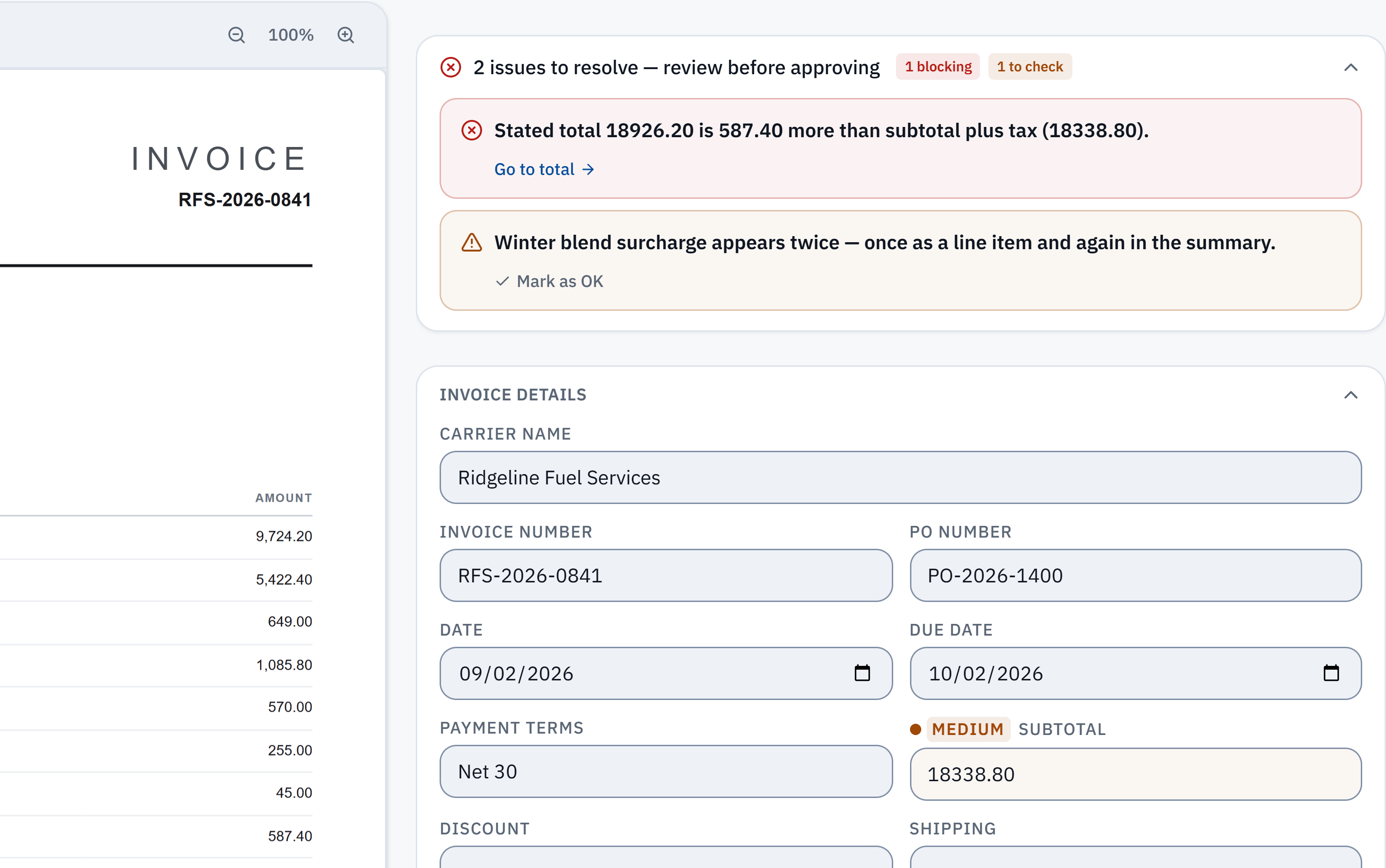
18,926.20 − 18,338.80 = 587.40. The stated total does not reconcile with the extracted subtotal and tax. Check it against the source.
Winter blend surcharge appears in a line item and the summary. A reviewer needs to check whether it was counted twice; this is a flag, not a deletion.
Without IPP
Invoice data entry by hand, step by step
- 1
Log it on arrival
Note the date you received it. Due dates run from the invoice date, but you need both to know what is late.
- 2
Check it is a new invoice
Make sure it is an invoice, not a statement or a quote, that it is addressed to your business, and that you have not entered the same supplier, number and amount already.
- 3
Key the header
Supplier name, invoice number, invoice date, due date or terms, and any purchase order number.
- 4
Key the lines and tax
Each line’s description, quantity, unit price and amount, then each tax line with its rate. Keep the invoice’s own currency.
- 5
Re-add the figures
Check the lines make the subtotal, and that subtotal minus discount plus shipping, fees and tax makes the printed total. Most keying errors surface here.
- 6
Code, approve, file
Choose the expense account, get it approved by whoever signs off spend, and keep the original with the entry.
- Every one of these steps is a person’s time per invoice, and the re-adding step is the one that gets skipped on a busy day.
In InvoiceParser Pro
The same steps, automated
- 1
Collect without retyping
Suppliers or your team email invoices to the inbox address IPP gives each client, or you upload up to 50 files at once: PDFs, scans or photos. The received date is kept beside the invoice date.
- 2
Reading and checking happen together
IPP reads the header, every line, each tax line and the totals; recognises statements and files holding several invoices and holds them; checks for duplicates; and re-adds the figures on every invoice.
- 3
People see only the exceptions
Each field is graded High, Medium or Low confidence. A total that does not add up is flagged with the difference, beside the source page. Clean invoices can be approved in bulk.
- 4
Coding is remembered
Pick the account once for a supplier and it is suggested next time. Approval chains can route invoices to the right person.
- 5
Out to your books
Push approved bills to QuickBooks Online, Xero or Zoho Books (paid plans and the trial), or export Excel, CSV or an import file on any plan.
- Auto-approve is off until you switch it on. Even then it holds back an invoice with a blocking flag, low confidence, a possible duplicate or a credit note.
Where IPP removes steps
- Header and lines
- By hand: Typed.
- With IPP: Read from the page.
- Statements and duplicates
- By hand: Caught if someone remembers.
- With IPP: Recognised and held; possible duplicates flagged.
- Re-adding the totals
- By hand: Done by hand, or skipped.
- With IPP: Done on every invoice, with the difference shown.
- Account coding
- By hand: Chosen every time.
- With IPP: Remembered per supplier.
- Getting it into the books
- By hand: Typed again into the accounting system.
- With IPP: Pushed after approval, PDF attached.
Can you eliminate invoice data entry completely?
You can eliminate the typing. You should not eliminate the looking: a misread total or a duplicate that reaches your books costs more than the minute it takes to check it. The realistic goal is that nobody types an invoice, and a person reviews only the ones the checks flag.
One customer, Rika, owner of Lombard International in Walvis Bay, Namibia, put it this way: “In a typical 10-hour admin workday, IPP has cut the time spent on accounting and documents by more than half.”
How well does the reading hold up?
In IPP's own benchmark, 181 synthetic test documents (clean PDFs, scans, phone photos and handwritten invoices) went through live production on 3 October 2026. 174 of the 181 came back with every key header field right, and 174 of the 179 documents with line items had every line right. That is a benchmark on test documents, not a promise about yours.
Method, misses and downloadable samplesWhat IPP does not do
- It does not pay suppliers.
- It does not split a PDF holding several invoices; it flags it and asks for separate files.
- Purchase order numbers are read, but three-way matching against receipts of goods is not built.
- Handwritten invoices and poor photos are read, with more fields left for you to check.
Questions
What is invoice data entry?
Copying the details of a supplier invoice into your accounting system: supplier, invoice number, dates, line items, tax and total, coded to an account and approved for payment.
How long does manual invoice data entry take?
It depends on how many lines an invoice has and how many checks you do. The time goes into typing the lines and re-adding the totals, which is exactly the part automation takes over.
How do I automate invoice data entry?
Send invoices to software that reads them (by upload or email), let it check the arithmetic and duplicates, review only what it flags, and push the approved invoices to your accounting system or export them.
Does automation work for scanned and photographed invoices?
Yes. IPP reads digital PDFs, scans and photos. Poor images are graded down so more fields come to you to check, and an unreadable page is turned away.
Is there a free way to start?
Yes. Convert up to 3 invoices a day on the free tool with no account, or use the free plan for 25 invoices a month with Excel and CSV export.
Try it on one of your own invoices
Upload a PDF, JPEG or PNG in the browser tool: up to three documents per browser per day, subject to shared limits. Excel keeps line items; CSV has one summary row per invoice. Unclaimed files expire after seven days. The Free workspace plan includes 25 invoices a month. Start the 14-day trial with 50 invoices, no credit card, then the Free plan to test approved accounting pushes.