Scan invoices into QuickBooks
Scan invoices into QuickBooks Online
Last updated
Scan one supplier invoice per file, then use QuickBooks Online’s Receipts upload to review and complete the bill. IPP adds line-item extraction, confidence and arithmetic checks before approval and push. Direct pushes use the selected invoice expense account, a matching client default, or the workspace default from Integrations; QuickBooks tax codes require configured mapping. Choose the workflow below for a single scan or a stack of supplier bills.
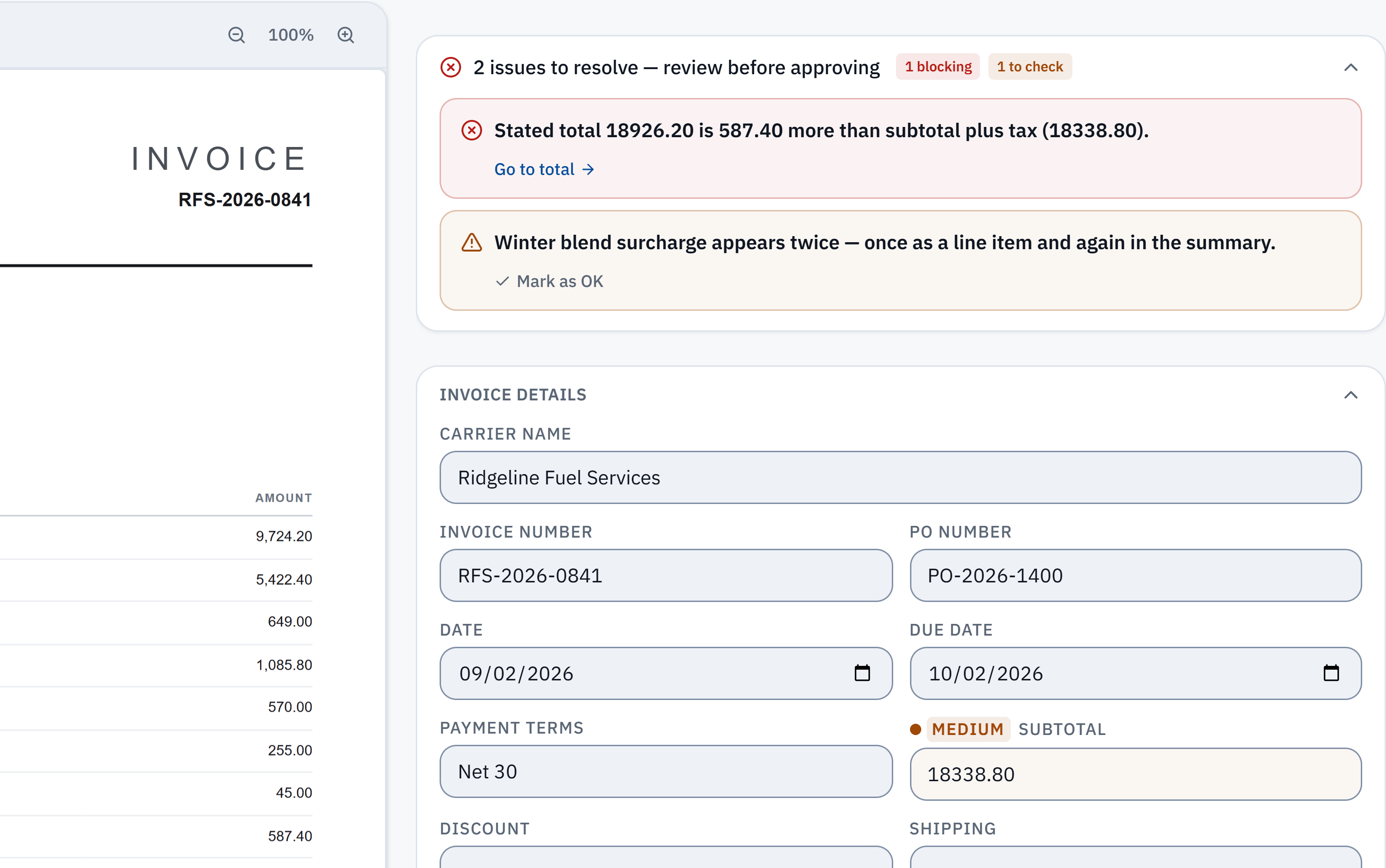
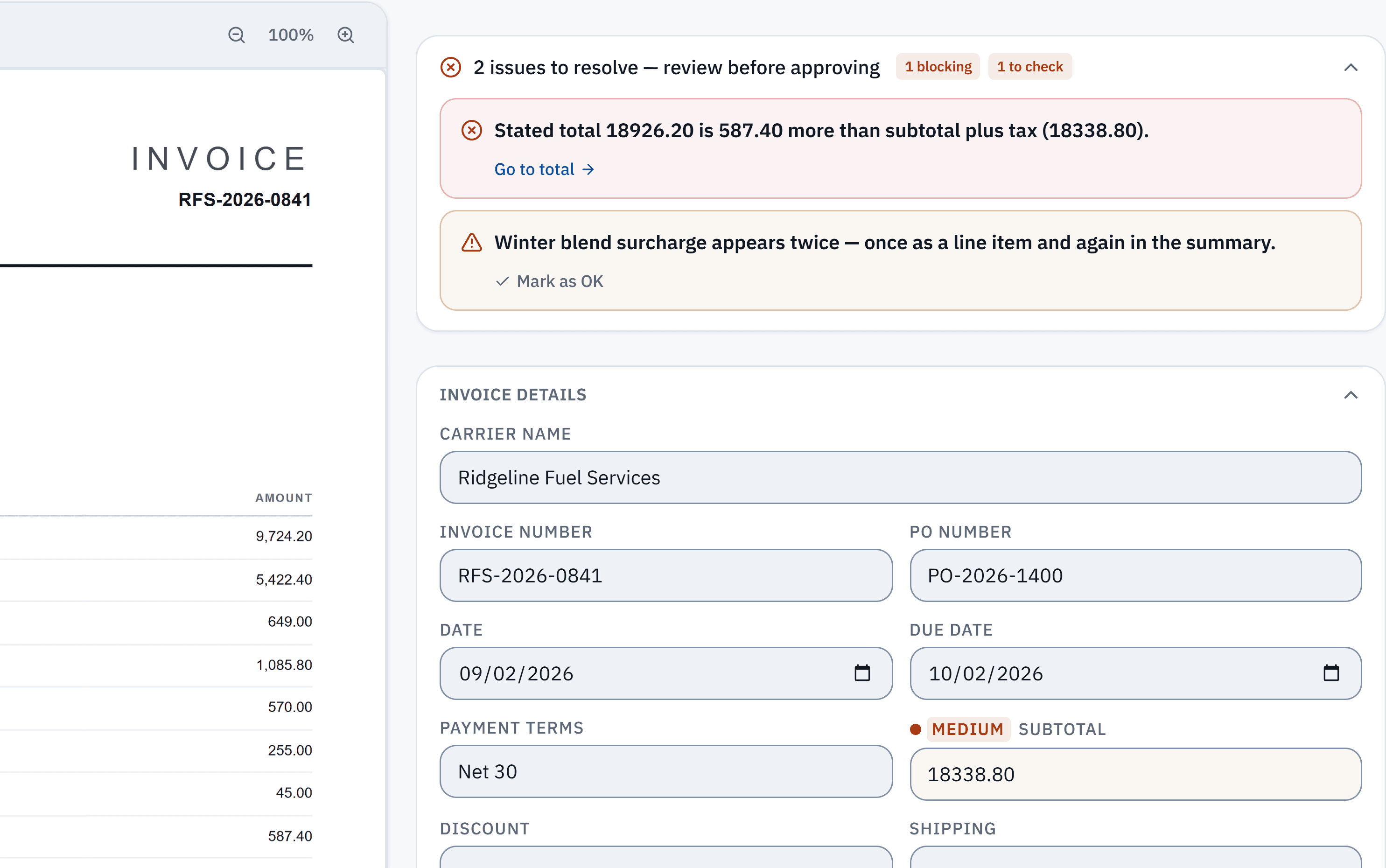
18,926.20 − 18,338.80 = 587.40. The stated total does not reconcile with the extracted subtotal and tax. Check it against the source.
Winter blend surcharge appears in a line item and the summary. A reviewer needs to check whether it was counted twice; this is a flag, not a deletion.
Without IPP
Scan into QuickBooks Online’s Receipts
- 1
Scan one invoice per file
Scan each invoice to its own PDF, JPG or PNG. Intuit asks for one receipt or bill per file. On a phone, open the QuickBooks app, go to Menu, Receipt snap, Receipt camera, take the photo and select Use this photo.
- 2
Upload on the web
Go to All apps > Accounting > Receipts and select Upload from computer (or Upload from Google Drive). You can also email the scans to your company’s forwarding address ending in @assist.intuit.com.
- 3
Open For review
Select the For review tab, then the scan. QuickBooks suggests matching transactions if it finds any.
- 4
Complete and save
Match it, or complete the transaction details (the lines and categories), add a memo, and select Save and close.
- Intuit says QuickBooks pulls the date, amount, vendor and the card’s last four digits from the image. The lines are yours to enter.
- One file at a time on the web, and the feature is limited on QuickBooks Online Free and Lite.
Checked against Intuit: Upload your receipts to QuickBooks and Intuit: Email receipts and bills, read 3 October 2026. Menus change; the vendor's page is the authority.
In InvoiceParser Pro
Scan a stack, check it, push it to QuickBooks
- 1
Scan the pile
Use any scanner or phone. Save one invoice per file (PDF, JPG, PNG or TIFF); a file holding several invoices is flagged and held, not split.
- 2
Upload up to 50 at once
Select Upload Invoices and add the whole folder, or email the scans to the inbox address IPP gives each client. Every file is read: supplier, invoice number, dates, line items, tax and totals.
- 3
Review only the flagged ones
Each invoice opens beside its scan. Fields are graded High, Medium or Low confidence; a blurred or cut-off scan is graded down, and figures that do not add up are flagged with the difference.
- 4
Approve
Pick the expense account (IPP remembers it for that supplier) and approve. Clean invoices can be approved in bulk.
- 5
Send to QuickBooks Online
Push the approved bills (paid plans and the trial): each arrives as a bill with one line per invoice line and the scan attached. Or download the QuickBooks Online bill import file on any plan.
Where IPP removes steps
- A stack of 40 scans
- By hand: 40 uploads, 40 reviews.
- With IPP: One upload of up to 50 files.
- What gets read
- By hand: Date, amount, vendor (per Intuit).
- With IPP: Header, every line item, tax lines and totals.
- Bad scans
- By hand: You notice when the numbers look wrong.
- With IPP: Graded down and flagged; an unreadable page is turned away.
- Totals check
- By hand: By eye.
- With IPP: On every invoice, with the difference shown.
- Approval
- By hand: Whoever saves the transaction has entered it.
- With IPP: Nothing reaches QuickBooks until someone approves it.
Scanning tips that change what can be read
IPP checks the first page of every scan or photo before reading it. These are the things that check looks at, so they are the things worth getting right at the scanner:
- Resolution: a page under 400 pixels on its long side cannot be read. A 200 to 300 DPI scan is plenty.
- Light: a near-black photo is turned away. Shoot in even light, without the flash glaring on glossy paper.
- Sharpness: motion blur and soft focus lower the confidence grade, so more fields come to you to check.
- Edges: text cut off at two or more edges of the photo is graded down. Get all four corners in frame.
- One invoice per file. If your scanner batches a stack into one PDF, split it first.
How well does the reading hold up?
In IPP's own benchmark, 181 synthetic test documents (clean PDFs, scans, phone photos and handwritten invoices) went through live production on 3 October 2026. 174 of the 181 came back with every key header field right, and 174 of the 179 documents with line items had every line right. That is a benchmark on test documents, not a promise about yours.
Method, misses and downloadable samplesWhat IPP does not do
- It does not drive your scanner. Scan with whatever you have, then upload or email the files.
- It does not split a PDF that holds several invoices; it flags it and asks for separate files.
- No QuickBooks Desktop. The push and import file are for QuickBooks Online.
- Handwritten invoices and poor photos are read, but expect to check more fields on them.
Questions
Can I scan invoices straight into QuickBooks Online?
Yes, through Receipts: upload the scan or snap it in the QuickBooks app, then complete it in For review. QuickBooks reads the date, amount and vendor; you enter the lines. IPP reads the lines and checks the totals before the bill is created.
What is the best scanner for QuickBooks?
Any scanner or phone that saves a clear PDF, JPG or PNG works, for QuickBooks and for IPP. What matters more than the device is one invoice per file, even light, all four edges in frame and around 200 to 300 DPI.
Are scanned bills and invoices handled differently?
In QuickBooks a supplier’s invoice is recorded as a bill. Both QuickBooks’ Receipts upload and IPP take the same scan either way; IPP pushes it as a bill, or as a vendor credit if it is a credit note.
Can I scan many invoices at once?
In IPP, yes: upload up to 50 files at once and they are read in parallel. QuickBooks’ web upload takes one file at a time.
Do I need a paid plan?
No for reading and exporting: the free plan reads 25 invoices a month and exports Excel, CSV and the QuickBooks Online import file. The direct push is on Starter ($79 a month) and up, and in the 14-day trial.
Try it on one of your own invoices
Upload a PDF, JPEG or PNG in the browser tool: up to three documents per browser per day, subject to shared limits. Excel keeps line items; CSV has one summary row per invoice. Unclaimed files expire after seven days. The Free workspace plan includes 25 invoices a month. Start the 14-day trial with 50 invoices, no credit card, then the Free plan to test approved accounting pushes.