The AI pipeline behind validated invoice data
InvoiceParser Pro uses a two-stage AI extraction pipeline — Azure Document Intelligence for layout and OCR, GPT-4o for structured enrichment — with a custom math validation and confidence scoring layer on every field.
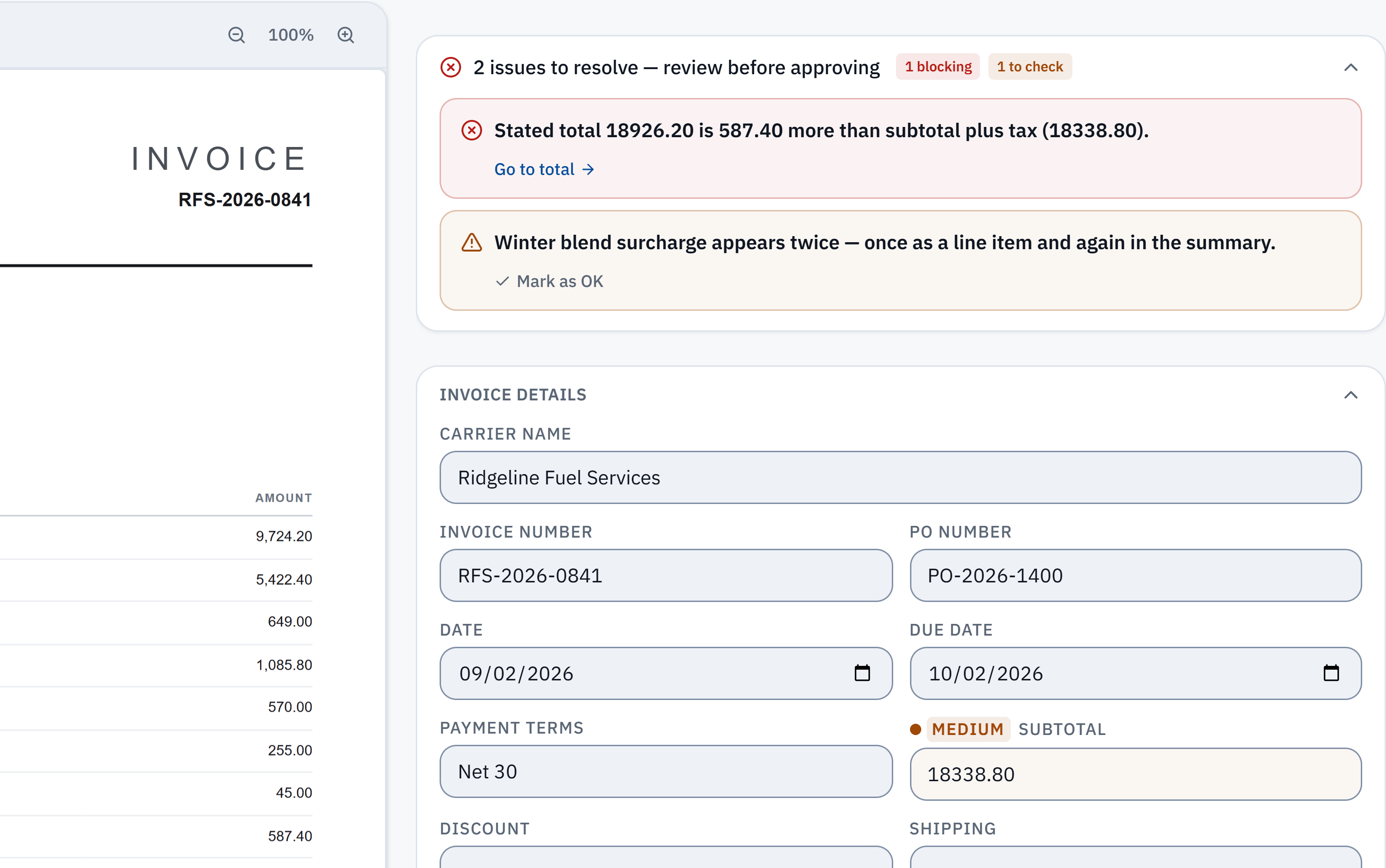
18,926.20 − 18,338.80 = 587.40. The stated total does not reconcile with the extracted subtotal and tax. Check it against the source.
Winter blend surcharge appears in a line item and the summary. A reviewer needs to check whether it was counted twice; this is a flag, not a deletion.
Three stages. Every invoice.
Every field. Every invoice.
| Category | Fields extracted |
|---|---|
| Header fields | Vendor name, invoice number, invoice date, due date, payment terms, PO number |
| Vendor details | Address, tax ID (VAT/GST/EIN), email, phone, country |
| Line items | Description, quantity, unit price, discount, line tax, line total — per row |
| Tax components | Each tax component individually: GST, CGST, SGST, IGST, VAT (standard + reduced), KDV, and any other named tax line |
| Totals | Subtotal, total discount, total tax, shipping, grand total |
| Payment details | Bank account/IBAN, SWIFT/BIC, BPay reference, payment method |
| Metadata | Currency (printed currency retained), confidence scores per field, extraction timestamp |
The check your accounting software doesn't do
InvoiceParser Pro verifies every invoice's arithmetic before it reaches your review queue. Most invoice OCR tools extract fields but never check if the numbers actually add up. We do — and flag the exact discrepancy when they don't.
Each line item total is computed and summed. Discrepancy from the stated subtotal is flagged with the exact delta.
Printed tax components, shipping and discounts are checked against the grand total. Review the source where rates or amounts are ambiguous.
When a mismatch is detected, the invoice confidence is automatically downgraded and the reviewer sees the exact discrepancy amount — so they can check whether it's an OCR error or an actual vendor billing mistake.
AI extraction questions
What AI does InvoiceParser Pro use?
InvoiceParser Pro uses a two-stage AI pipeline: Azure Document Intelligence (Microsoft's production OCR and document layout service) for initial layout analysis and field extraction, and GPT-4o for structured data enrichment, normalization, and edge-case handling. A custom validation layer then performs math validation and confidence scoring on every field.
How accurate is InvoiceParser Pro's AI extraction?
InvoiceParser Pro combines Azure Document Intelligence, GPT-4o enrichment, automatic math validation, and per-field confidence scoring. Fields that do not meet confidence thresholds are flagged for human review before export.
Does InvoiceParser Pro use machine learning or LLMs?
Both. The first stage uses Azure Document Intelligence, which is a trained ML model specialized for document layout and field extraction. The second stage uses GPT-4o (OpenAI's large language model) for structured enrichment — normalizing extracted text into typed fields, handling ambiguous formats, and resolving edge cases that pattern-matching alone can't handle.
How does the confidence scoring work?
Each extracted field is classified as High, Medium or Low confidence. Use field confidence to guide review alongside the source document; it does not guarantee every field is correct.
What is math validation and why does it matter?
Math validation checks subtotal − discount + shipping + fees + tax = total, and compares the invoice lines with the printed subtotal. A mismatch is flagged with its figures for review before approval or accounting push. Check the source document to decide whether the discrepancy came from extraction or the invoice itself.
See the AI in action on your invoices
14-day free trial — upload real invoices and see the extraction accuracy, math validation, and confidence scoring before you pay anything.