Know what a load actually cost you.
One trip picks up fuel, haulage, port handling and clearing charges from four different suppliers, in three currencies, on paperwork that turns up weeks later. InvoiceParser Pro reads all of it and lets you allocate every cost to a trip number — including the invoices that arrive long after the truck is back.
Or try a document first: up to 3 invoices a day, no signup.
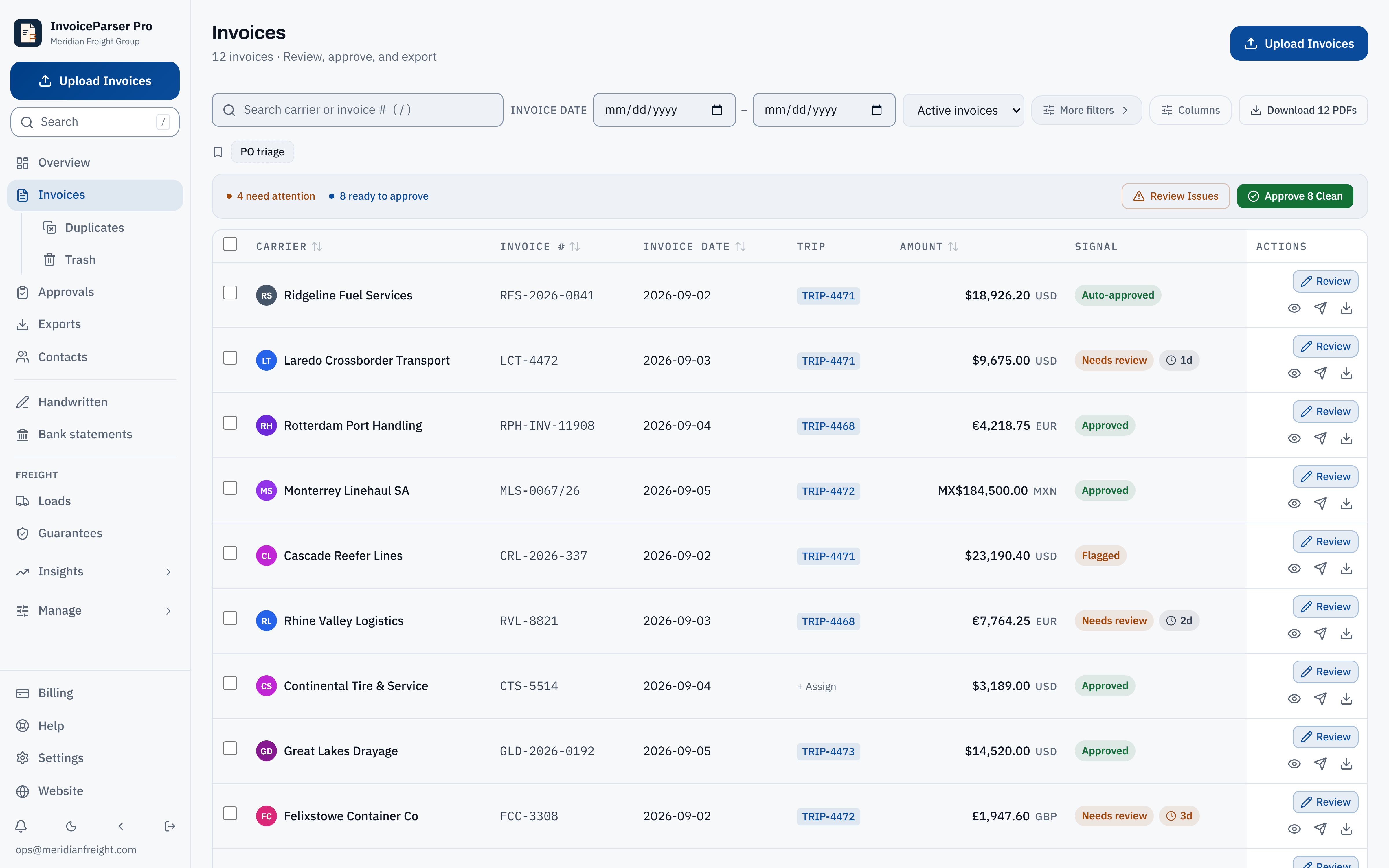
Product capture · synthetic data
Cost per trip
Carrier, fuel, port and clearing costs — allocated to the load that incurred them
Trip allocation
Tag any invoice to a load, whenever the number arrives
Currency kept
Each cost shown in the currency it was billed
Invoice date
Filter on the document's date, not the day it landed
Triage first
Clean invoices can clear themselves; exceptions surface
Per-trip
Cost allocation on every invoice
Multi-currency
Each invoice in the currency billed
Handwritten
Fuel slips and weighbridge notes
Approved
Paid accounting push
Why freight is different
Generic AP software assumes the invoice arrives before you need it.

Freight does not work that way. The load runs, the truck comes back, and the paperwork keeps arriving for weeks — a fuel slip from a filling station eight hundred kilometres away, a clearing agent's invoice, port handling, a tyre replaced at the roadside. Half of it is handwritten. Some of it is in a different currency than the load was sold in.
By the time it has all landed, the question “what did that trip cost” means opening a spreadsheet and going hunting. Most tools cannot even ask it, because they file costs by supplier and month, which is how an accountant thinks and not how a load works.
The fix is not clever. It is letting you write your own trip number on any cost, at any time, including after the invoice is filed and paid.
Customer evidence · freight operator
Built with a freight company, not for a persona.
“In a typical 10-hour admin workday, IPP has cut the time spent on accounting and documents by more than half. Even on a lighter day with just 20 invoices, what used to take an hour or two of tedious capturing is knocked out in minutes.”
Before IPP, in her words: “Pure manual capture. To be quite honest, that is a complete no-go for me now—I will never go back to manual entry!”
“The vendor emails a massive batch scan, I drop it into IPP, and within 5 minutes, every single invoice, line item, amount, and date is extracted and reconciled.”
Customer-reported experience. Results depend on the documents and workflow.
What you get
The unglamorous half of freight, handled.
Allocate costs to a trip
One load picks up fuel, haulage, port handling and clearing charges from four different suppliers. Tag each invoice with your own trip number so the cost of a load is a thing you can see, not a thing you reconstruct. Add or change it whenever the number turns up.
Three currencies, one screen
Cross-border work bills in whatever the corridor uses. Every invoice keeps the currency it was issued in and is shown that way, so nothing is quietly summed across currencies that do not add up.
Handwritten slips have their own lane
A fuel slip scrawled at a filling station on a long-haul corridor is not a typed carrier invoice, and pretending otherwise is how these get lost. Scan a stack and they are read and queued like anything else.
Paperwork that arrives late still files correctly
Every document carries both the date printed on it and the date it reached you. Date filters use the invoice's own date, which is the one that matches how a month gets closed. Invoices with no readable date are labelled, not hidden.
Duplicates that are actually duplicates
Sequential invoice numbers from one supplier on one day are separate bills, not a duplicate group. Detection will not merge documents whose invoice numbers disagree, so nothing real gets deleted on your behalf.
Pull a month of PDFs in one go
Filter to a carrier, a month, or whatever you are chasing, and download every matching PDF at once — renamed by supplier and invoice number. It takes the whole filter, not the page you happen to be looking at.
Port, clearing and workshop costs too
Container handling, clearing agents, tyres, workshop parts. Anything with an invoice goes in the same place as the linehaul, which is the only way a per-trip figure means anything.
Fuel spend, captured per stop
Every fuel invoice recorded against the trip it fuelled, in the currency it was paid. The record you need before anyone can tell you a pump charged over the gazetted price.
How it works
Three steps, and nothing changes downstream.
Send the paperwork in
Upload a batch, forward it to a dedicated email address, or scan a pile of slips. Typed invoices and handwritten ones both have a home.
Tag it to the trip
Assign a trip number as you go, or later when the number comes through. Previously used numbers are suggested; a brand-new one is always accepted.
Approve and push
Clean invoices can auto-approve when you switch it on. The rest surface for review. Paid plans and the trial can push approved bills to QuickBooks, Xero or Zoho Books within the accounting limits.
Not available yet
Rate auditing isn't here yet.
IPP does not match a carrier's invoice against the rate you agreed. It is not available yet, and we would rather tell you that than let a screenshot imply otherwise. What ships today is the record underneath it: every cost captured, allocated to a trip, in the currency it was billed. If rate matching matters to you, tell us.
Questions freight operators ask
By kind of paperwork
- Cross-border invoices: Namibia, South Africa, Zambia
- Priced in USD or EUR, payable in ZAR or NAD
- Clearing and forwarding invoices
- Supplier statements in the AP inbox
Practical guides for month-end, currency costing, duplicates and per-load margins: freight AP guides.
Comparing tools? Freight invoice processing software, compared and AP automation in South Africa and Namibia.
Put one month of paperwork through it.
Start with a 14-day trial and 50 invoices. Then continue on Free with 25 invoices a month. No card required. Try a representative set of your paperwork and review the results before changing your workflow.
Accounting handoff, with the limits stated
Paid plans and the trial can push approved bills. Each workspace connects to one company per provider; separate client books use exports or separate workspaces and sign-ins. Direct pushes use the selected invoice expense account, a matching client default, or your workspace default. QuickBooks supports mapped tax codes; Xero and Zoho Books pushes do not set tax codes.
Also built for
- Accounting firms Many clients in one workspace, each with its own email-in address. Staff review the flagged bills, not every bill.
- Bookkeepers Monthly bill entry for clients: every line read, the totals checked, then pushed to QuickBooks Online or exported.
- AP teams and controllers Approval chains, duplicate checks and a recorded history of who approved what, and when.
- Small business owners For owners doing their own books. Supplier bills checked before they reach your books, 25 a month free.
Want to see the check on your own paperwork first? Try a document: up to 3 invoices a day, no signup.