Invoice math and duplicate checksLast updated
Invoice math and duplicate checker software
Invoice math and duplicate checker software should explain what it checks and leave uncertain cases for review. InvoiceParser Pro is our product: quantity × unit price, lines against subtotal, tax and total checks, plus possible duplicates against 400 days of workspace invoices. Different invoice numbers are never grouped; nothing is automatically deleted. Compare capture tools and enterprise AP options below by their published checks and limits.
We make InvoiceParser Pro, one of the products on this list. Every other product’s facts were read on its maker’s own website (4 October 2026), and none was tested hands-on for this version. How we compared.
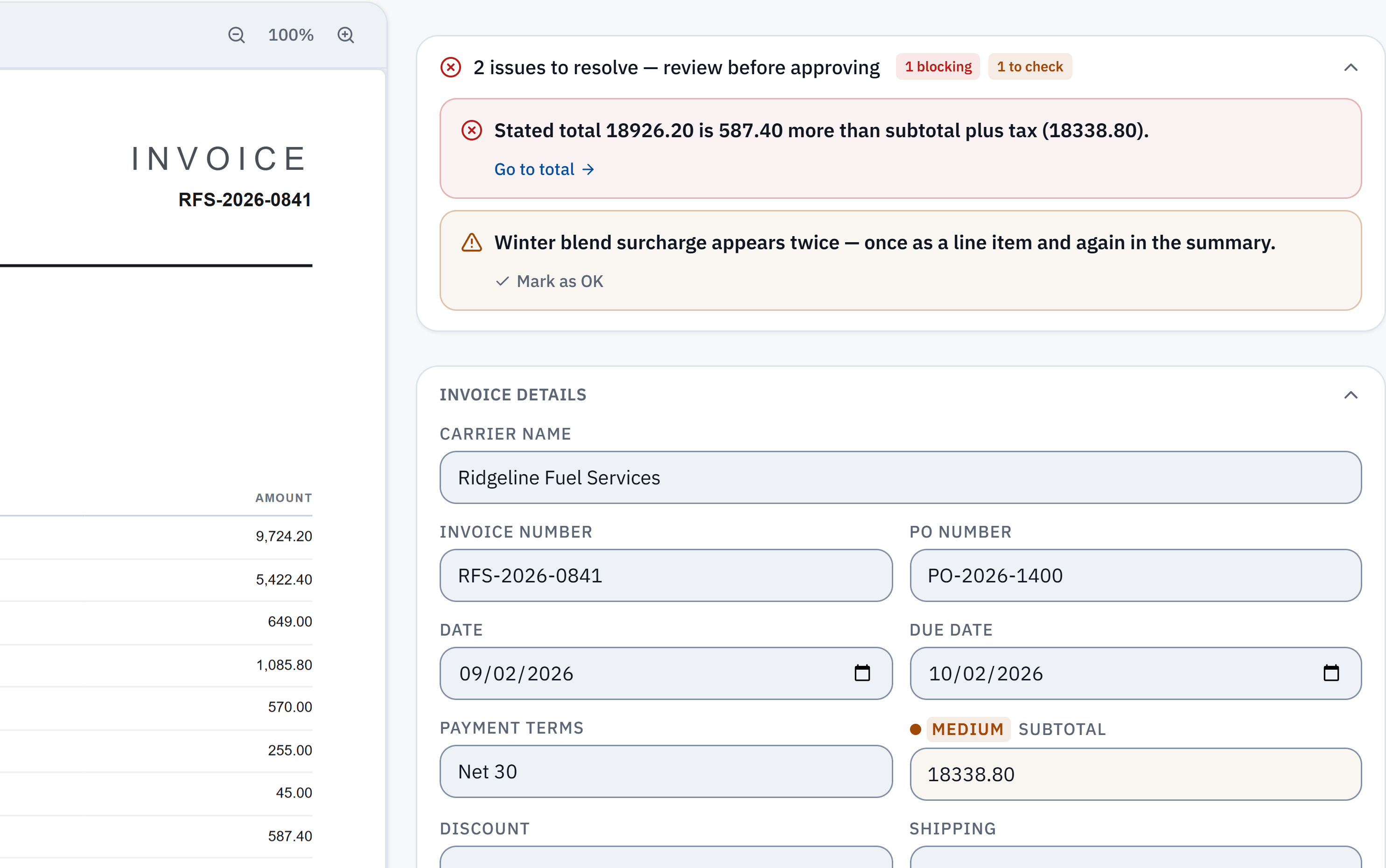
18,926.20 − 18,338.80 = 587.40. The stated total does not reconcile with the extracted subtotal and tax. Check it against the source.
Winter blend surcharge appears in a line item and the summary. A reviewer needs to check whether it was counted twice; this is a flag, not a deletion.
Start with a check you can verify
Try the fictional quantity-and-rate example: four units at $75 should be $300, but the invoice prints $375. Its printed lines still add up to its printed total. A totals-only check would miss the $75 line discrepancy. Download the invoice and its answer key to compare the printed figures with the calculated expectation; this is a worked calculation, not a live extraction result.
Then check one of your own invoices with the free math checker. Compare any flagged figures with the source and download the spreadsheet. This single-invoice tool checks arithmetic; it does not compare your document with past invoices for duplicates.
For repeated supplier bills, evaluate a workspace with your own invoice history. The free plan includes 25 invoices a month; the 14-day trial includes 50. Paid plans add capacity for recurring work. Use the published plans to choose the volume and workflow you need.
- Arithmetic: inspect the quantity, rate and printed amount, then the subtotal, tax and total. A consistent total does not prove the agreed rate or that goods arrived.
- Duplicates: a workspace compares a new invoice with invoices received in the last 400 days. Different stated invoice numbers are never grouped, and you decide which flagged copies to keep.
- Review: a possible duplicate is a reason to check the source and history. IPP does not establish that you already paid the bill or move money for you.
At a glance
Ranked for one question: which software checks both the arithmetic and duplicates on supplier invoices, for a team that wants to start without a sales call? Tools that publish both checks and a self-serve price come first; enterprise platforms follow, and where a vendor does not state an arithmetic check, the table says so.
1. InvoiceParser ProOur product
Small and mid-size AP teams and bookkeepers who want both checks on every invoice before it reaches the books
Free plan for 25 invoices a month; Starter $79 a month (200 invoices), Team $249 (1,000), Scale $599 (5,000); billed annually $63, $199 and $479 a month; the single-invoice math checker is free with no sign-up (3 a day)
Facts checked 4 October 2026
Standout: Line-level check (quantity × rate), subtotal, VAT against its printed rate and total, with the exact difference; duplicates never grouped across different invoice numbers
Limits: Does not check prices against purchase orders or contracts; duplicate checks look at invoices in your own workspace only
2. DocuClipper
Small businesses and accounting firms with a low monthly page count who want both checks before posting to QuickBooks or Xero
From $20/month billed annually for 60 pages; 14-day free trial, no card
Price terms checked 9 October 2026
Standout: Lines must sum to the subtotal and subtotal plus tax to the total; duplicates by same vendor, amount and date within 90 days
Limits: Priced per page, and unused pages do not carry over; duplicates matched on vendor, amount and date
3. AutoEntry
Bookkeepers who want arithmetic validation as part of low-cost capture into Sage, Xero or QuickBooks
From $13 a month for 50 credits; an invoice with line items uses 2 credits
Price terms checked 9 October 2026
Standout: Arithmetic validation rules stop incorrect invoices being posted
Limits: Duplicate detection is not described on the pages read
4. KlearStack
AP teams that want fraud checks, near-duplicate detection and matching to purchase orders and goods receipts
Not published (book a pilot)
Facts checked 4 October 2026
Standout: Catches resubmitted, renamed, rescanned or lightly edited invoices, weeks or months apart
Limits: No published price; a sales-led evaluation
5. FinMark.ai
Enterprise finance teams that want duplicates checked at intake, before any other processing
Not published (get a demo)
Facts checked 4 October 2026
Standout: Near-duplicates: slightly different invoice numbers, amounts off by a few dollars, or split invoices
Limits: Built for enterprise finance teams; no published price
6. Rossum
Enterprise AP teams receiving invoices through several channels
Starter from $18,000 a year; duplicate handling on the quoted Business plan; one-year minimum
Price terms checked 9 October 2026
Standout: Duplicate detection and handling across channels, inside a full document automation platform
Limits: Duplicate handling is not on the entry plan; arithmetic checks are not stated on the pricing page
7. Tipalti
Companies that want duplicate detection inside a payables and supplier payments platform
Plans from $99 a month, plus transaction pricing per invoice and payment
Facts checked 4 October 2026
Standout: AI duplicate detection to prevent overpayments, with supplier payments in the same system
Limits: Arithmetic checks are not stated on the pages read; fees per invoice and payment on top of the plan
8. Stampli
AP teams that want invoice coding, approvals and duplicate flags in one shared workspace
Not published (request a quote)
Facts checked 4 October 2026
Standout: Its AI assistant codes every line, predicts approvers and flags duplicates
Limits: Arithmetic checks and how duplicates are matched are not stated on the pages read; no published price
9. Medius
Mid-size and large AP departments that want fraud and risk detection with their AP automation
Not published (book a demo)
Facts checked 4 October 2026
Standout: Flags the same invoice submitted more than once, plus payment-detail and supplier changes
Limits: Arithmetic checks are not stated on the page read; no published price
10. AppZen
Large enterprises that want duplicate checks at every stage of an automated AP process
Not published (request a demo)
Facts checked 4 October 2026
Standout: Re-checks for duplicates at upload, at coding and at approval, and notifies the right people
Limits: Aimed at very large companies; arithmetic checks are not stated on the page read
The list, one by one
1. InvoiceParser ProOur product
Best for: Small and mid-size AP teams and bookkeepers who want both checks on every invoice before it reaches the books
Every invoice InvoiceParser Pro reads is checked: subtotal less discount plus shipping, fees and tax must equal the total, each line’s quantity times rate must equal its amount, and the VAT must match its printed rate. A mismatch is flagged with the size of the gap (“Line 3 is off by $75.00”), and the invoice waits for a person.
Possible duplicates are flagged against invoices received in the last 400 days in the workspace. Invoices that state different invoice numbers are never grouped, you choose which copies to keep, nothing is deleted automatically, and “not a duplicate” stays dismissed. On IPP’s own benchmark (181 synthetic documents, 3 October 2026), 5 of the 5 invoices whose printed figures did not add up were flagged.
Limits: Does not check prices against purchase orders or contracts; duplicate checks look at invoices in your own workspace only
2. DocuClipper
Best for: Small businesses and accounting firms with a low monthly page count who want both checks before posting to QuickBooks or Xero
DocuClipper reads invoices, bank statements and receipts. For invoices it validates that the line items sum to the subtotal and that subtotal plus tax equals the total, and it flags invoices with the same vendor, amount and date within a 90-day window before posting to QuickBooks or Xero.
Pick it if your volume is small and you also convert bank statements. It has no permanent free plan; the trial is 14 days.
Limits: Priced per page, and unused pages do not carry over; duplicates matched on vendor, amount and date
3. AutoEntry
Best for: Bookkeepers who want arithmetic validation as part of low-cost capture into Sage, Xero or QuickBooks
AutoEntry captures invoices, receipts and statements and uses arithmetic validation rules so that incorrect invoices are not posted to your accounting software.
Pick it for cheap capture with a math check; check its duplicate handling in the trial.
Limits: Duplicate detection is not described on the pages read
4. KlearStack
Best for: AP teams that want fraud checks, near-duplicate detection and matching to purchase orders and goods receipts
KlearStack cross-checks totals, line items and tax arithmetic on every invoice, matches invoices against the purchase order and goods receipt, and catches duplicates that have been renamed, rescanned or lightly edited.
Pick it if altered and resubmitted invoices are the risk you are managing.
Limits: No published price; a sales-led evaluation
5. FinMark.ai
Best for: Enterprise finance teams that want duplicates checked at intake, before any other processing
FinMark.ai checks every invoice against history before processing, blocks exact duplicates and flags near-duplicates, and runs sanity checks including whether line items sum to the total and whether the tax matches its rate and base.
Pick it if you are an enterprise team and split or slightly altered invoices are a real problem.
Limits: Built for enterprise finance teams; no published price
6. Rossum
Best for: Enterprise AP teams receiving invoices through several channels
Rossum is enterprise document automation. Its Business plan adds duplicate detection and handling across channels, along with master data matching.
Pick it if you are automating AP at enterprise scale and duplicates arrive by email, upload and API at once.
Limits: Duplicate handling is not on the entry plan; arithmetic checks are not stated on the pricing page
7. Tipalti
Best for: Companies that want duplicate detection inside a payables and supplier payments platform
Tipalti is AP automation and supplier payments. Its invoice management includes AI-powered duplicate detection to prevent overpayments, alongside approval routing.
Pick it if you also want to pay suppliers, especially across borders, from the same system.
Limits: Arithmetic checks are not stated on the pages read; fees per invoice and payment on top of the plan
8. Stampli
Best for: AP teams that want invoice coding, approvals and duplicate flags in one shared workspace
Stampli is an AP platform built around collaboration on each invoice. Its AI assistant captures and codes every line, identifies vendors, predicts approvers and flags duplicates.
Pick it if approval chasing is your biggest problem and duplicate flags are a bonus.
Limits: Arithmetic checks and how duplicates are matched are not stated on the pages read; no published price
9. Medius
Best for: Mid-size and large AP departments that want fraud and risk detection with their AP automation
Medius sells AP automation with a fraud and risk detection product that identifies duplicate invoices, discrepancies in payment amounts and changes in supplier information before payment.
Pick it if supplier fraud, not just keying errors, is the risk you need to control.
Limits: Arithmetic checks are not stated on the page read; no published price
10. AppZen
Best for: Large enterprises that want duplicate checks at every stage of an automated AP process
AppZen automates the invoice lifecycle for some of the world’s largest companies and confirms at every stage, from upload to coding to approval, that an invoice is not a duplicate.
Pick it if you are an enterprise automating AP end to end.
Limits: Aimed at very large companies; arithmetic checks are not stated on the page read
Two checks that catch different mistakes
An arithmetic check asks whether one invoice is internally consistent: do the lines add up to the subtotal, does the tax match its rate, does the total equal subtotal plus tax and fees? It catches keying mistakes and altered figures on a single document. A duplicate check compares an invoice with the ones you already have, so the same bill is not paid twice, including when it arrives again by email after you uploaded the paper copy.
Ask any vendor how its duplicate check decides two invoices are the same. Matching on vendor, amount and date catches resent copies but can also group two genuine invoices for the same amount; matching that respects different invoice numbers avoids that, and fuzzy matching catches edited resubmissions.
How we compared
- Every fact about another product (what it does, who it is for, its published prices and limits) was read on that product’s own website on 4 October 2026. The pages are listed under each product below. Review sites and other lists were not used as sources.
- The other products were not tested hands-on for this version of the page: nothing here measures how well they read invoices. Where a vendor does not publish a price or a limit, the page says “not published” rather than guessing.
- InvoiceParser Pro’s figures come from its own published benchmark: 181 synthetic test documents run through live production on 3 October 2026, where 96.1% of documents had every key header field right and 98.7% of key header fields were right. The method, every miss and sample documents are on the accuracy benchmark page. It is our test set, not your documents, and it is not compared with any other vendor’s figures.
- We make InvoiceParser Pro, so read our placement with that in mind. The order follows the question this page answers, and every entry, ours included, lists its limits.
- Prices and features change. Confirm them with the vendor before you buy, and if something here is out of date, tell us at support@invoiceparserpro.com and we will correct it.
Questions buyers ask
What software checks invoice math automatically?
InvoiceParser Pro checks every invoice it reads: each line’s quantity times rate, the lines against the subtotal, the VAT against its printed rate, and the total, and it says where the gap is. DocuClipper checks that line items sum to the subtotal and subtotal plus tax equals the total. AutoEntry, KlearStack and FinMark.ai also describe arithmetic checks.
How does duplicate invoice detection work?
Each tool compares a new invoice with past ones. DocuClipper flags the same vendor, amount and date within 90 days. FinMark.ai and KlearStack also catch near-duplicates, such as slightly changed invoice numbers or rescanned copies. InvoiceParser Pro checks invoices received in the last 400 days in your workspace and never groups invoices that state different invoice numbers.
Can I check one invoice’s math for free?
Yes. InvoiceParser Pro’s invoice math checker reads a PDF or phone photo and tells you, in plain words, where it does not add up, with no sign-up, up to 3 invoices a day. The file is kept for 7 days so you can save it to a free workspace, then deleted.
Can the free invoice math checker find duplicates?
The no-signup math checker checks one invoice’s arithmetic. Duplicate detection needs your invoice history in an InvoiceParser Pro workspace. A possible duplicate is flagged for your decision; it is not proof of a duplicate payment.
Does a passing math check mean an invoice is ready to pay?
A passing arithmetic check means the figures that were read are internally consistent. Compare them with the source, then check the agreed price, delivery and payment history separately. InvoiceParser Pro does not verify a contracted rate or establish that an invoice has already been paid.
Do these tools stop the duplicate being paid?
They flag it before approval or posting; what happens next is your decision. InvoiceParser Pro never deletes a flagged copy on its own: you choose which copies to keep, and removed copies go to Trash for 30 days.
Which of these tools are built for small businesses?
InvoiceParser Pro, DocuClipper and AutoEntry publish self-serve prices and can be started without a sales call. KlearStack, FinMark.ai, Stampli, Medius and AppZen sell through demos, and Rossum’s plans start at $18,000 a year.
Sources
Each vendor’s own pages, with the date they were read. InvoiceParser Pro’s facts: pricing and the accuracy benchmark.
- DocuClipper, checked :
- DocuClipper AP automation: https://www.docuclipper.com/solutions/accounts-payable-automation-software/
- DocuClipper pricing: https://www.docuclipper.com/pricing/
- AutoEntry, checked :
- What is AutoEntry: https://help.autoentry.com/en/articles/1782618-what-is-autoentry
- AutoEntry pricing: https://www.autoentry.com/pricing
- KlearStack, checked :
- KlearStack invoice fraud detection: https://klearstack.com/invoice-fraud-detection
- FinMark.ai, checked :
- FinMark.ai duplicate detection: https://finmark.ai/accounts-payable-automation/duplicate-invoice-detection
- FinMark.ai home page: https://finmark.ai/
- Rossum, checked :
- Rossum pricing: https://rossum.ai/pricing/
- Tipalti, checked :
- Tipalti invoice management: https://tipalti.com/ap-automation/invoice-management/
- Tipalti pricing: https://tipalti.com/pricing/
- Stampli, checked :
- Stampli AP automation platform: https://www.stampli.com/ap-automation-platform/
- Stampli pricing: https://www.stampli.com/pricing/
- Medius, checked :
- Medius fraud and risk detection: https://www.medius.com/solutions/fraud-risk-detection/
- AppZen, checked :
- AppZen AP automation: https://www.appzen.com/ap-automation
Related pages
Try it on your own invoices
Turn an invoice into a spreadsheet with the math checked, free and with no sign-up, or start a workspace. 14-day trial with 50 invoices, no credit card, then the Free plan.