Invoice API
Which invoice OCR API returns line items and checks the math?
Last updated
InvoiceParser Pro’s REST API returns invoice headers, line items, tax lines, confidence and an arithmetic validation result in JSON. REST access requires Scale; its price is shown below from the plan definitions. Azure Document Intelligence and Amazon Textract offer extraction models if you want to build the review and validation workflow yourself. Compare the output, batch limits and webhook handling before integrating.
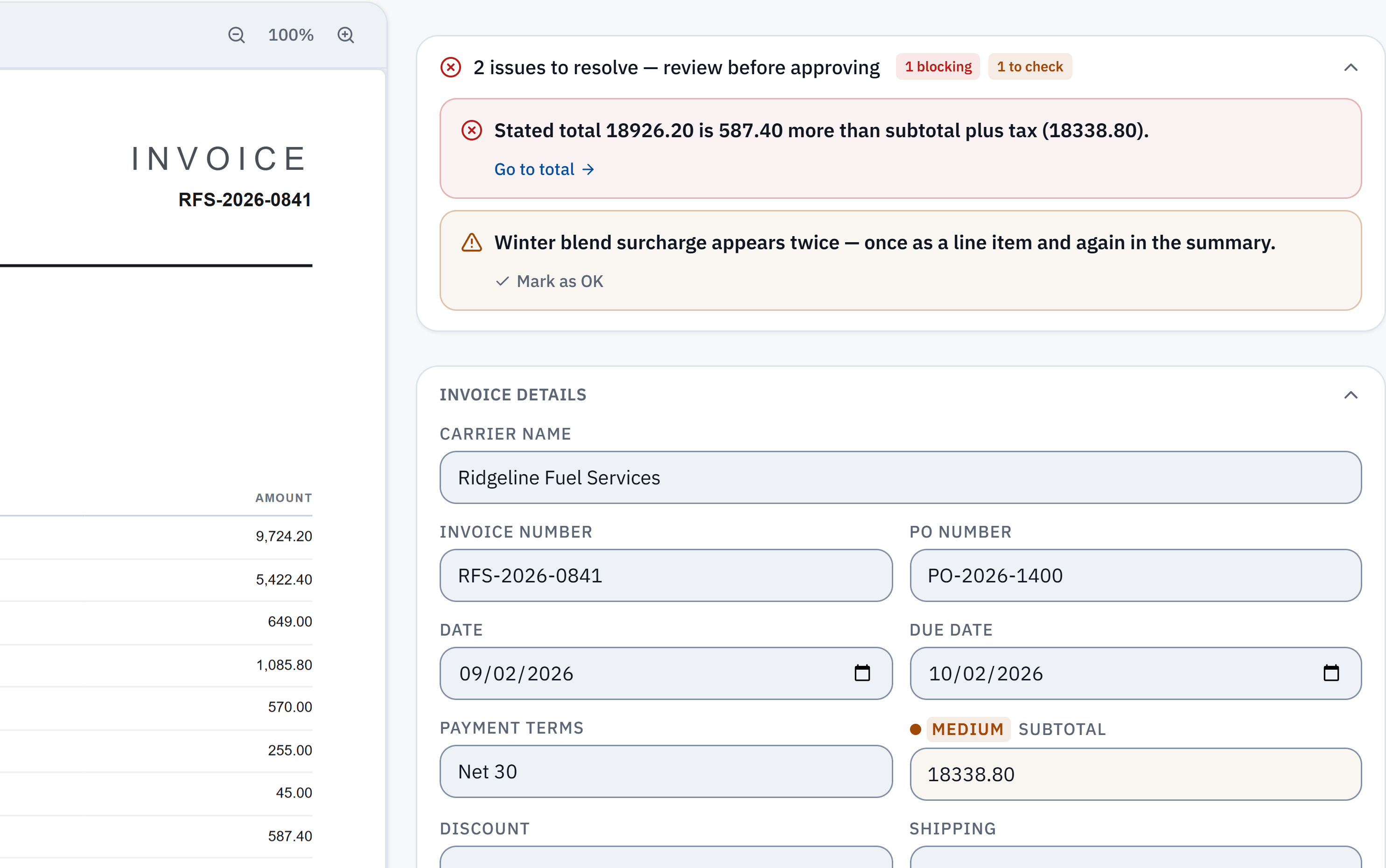
18,926.20 − 18,338.80 = 587.40. The stated total does not reconcile with the extracted subtotal and tax. Check it against the source.
Winter blend surcharge appears in a line item and the summary. A reviewer needs to check whether it was counted twice; this is a flag, not a deletion.
Without IPP
Build it on a cloud document model
- 1
Send the file to a prebuilt model
Call Azure Document Intelligence with the prebuilt-invoice model, or Amazon Textract’s AnalyzeExpense, with the PDF or image.
- 2
Map the fields
Map the returned fields (invoice id, dates, vendor, subtotal, tax, total) and the line items (description, quantity, unit price, amount) into your own schema.
- 3
Write the arithmetic checks
Recompute quantity times unit price per line, the lines against the subtotal, the tax against the printed rate, and subtotal plus charges and tax against the total, allowing for rounding.
- 4
Decide what needs a person
Combine the per-field confidence and your checks into a rule for which documents go straight through and which wait for review.
- You own the edge cases: VAT-inclusive layouts, totals printed in two currencies, credit notes, statements sent as invoices, and files holding several invoices.
Checked against Microsoft Learn: Document Intelligence invoice model and AWS: Analyzing invoices and receipts with Amazon Textract, read 4 October 2026. Menus change; the vendor's page is the authority.
In InvoiceParser Pro
Use the InvoiceParser Pro API
- 1
Create a key
On the Scale plan, create a REST API key on the API Access page and send it as a Bearer token.
- 2
Upload the invoice
POST the file to /api/v1/invoices, or up to 25 files at once to /api/v1/batches. An external_id makes a retry safe.
- 3
Get the result
Poll GET /api/v1/invoices/{job_id}, or register a webhook: deliveries for job.completed, job.failed and batch.completed are signed with HMAC-SHA256.
- 4
Read the checks
The result carries line_items, confidence (HIGH, MEDIUM or LOW), validation_status, validation_explanation (for example “Subtotal + tax does not equal total”) and automation_ready, which is true only when confidence is HIGH and the math passed.
What the validation covers
The same checks as the app and the free math checker: each line’s quantity times unit price, the lines against the subtotal, subtotal − discount + shipping + fees + tax = total, and the VAT against its printed rate when the page prints one. Multi-rate tax lines are kept separately, and each invoice keeps the currency it was issued in.
automation_ready gives an automated pipeline one gate to post on, and everything else goes to a person. Requests to POST /api/v1/invoices are limited to 60 a minute per key.
How well does the reading hold up?
In IPP's own benchmark, 181 synthetic test documents (clean PDFs, scans, phone photos and handwritten invoices) went through live production on 3 October 2026. 174 of the 181 came back with every key header field right, and 174 of the 179 documents with line items had every line right. That is a benchmark on test documents, not a promise about yours.
Method, misses and downloadable samplesWhat the API does not do
- REST API keys need the Scale plan. There is no free API tier: try the reading on the free tool, or in an AI assistant through the MCP server.
- It does not split a file holding several invoices; such a file is flagged.
- It does not compare invoices with purchase orders or with prices you agreed.
- It returns data and files; posting to your ERP from the API is up to you (the app pushes to QuickBooks Online, Xero and Zoho Books).
Questions
Which invoice API checks that the totals add up?
InvoiceParser Pro’s REST API returns validation_status and a plain-language validation_explanation for every invoice, from a check of each line, the subtotal, the tax and the total. The Azure and AWS invoice models document extraction, not an arithmetic check.
Does the API return line items?
Yes, every line with its description, quantity, unit price and amount, on every result.
Which plan includes the API?
Scale ($599 a month, or less billed annually). Every paid plan can create an AI assistant key for the MCP server, which does not open the REST API.
Can I get results pushed instead of polling?
Yes. Register a webhook; deliveries for job.completed, job.failed and batch.completed are signed with HMAC-SHA256.
How do I know which results are safe to post automatically?
Use automation_ready: it is true only when the document’s confidence is HIGH and the math check passed. Send everything else to a person.
Try it on one of your own invoices
Upload a PDF, JPEG or PNG in the browser tool: up to three documents per browser per day, subject to shared limits. Excel keeps line items; CSV has one summary row per invoice. Unclaimed files expire after seven days. The Free workspace plan includes 25 invoices a month. Start the 14-day trial with 50 invoices, no credit card, then the Free plan to test approved accounting pushes.